
Quick Answer
Ransomware protection is not one product. It is a layered set of controls — multi-factor authentication on every remote entry point, patched internet-facing systems, least-privilege admin rights, endpoint detection and response, network segmentation, and backups that are immutable or offline and restore-tested. Recovery depends almost entirely on the last item: businesses that restore quickly are the ones whose backups were unreachable from the network the attacker controlled. In India, a ransomware incident must also be reported to CERT-In within six hours, and to the Data Protection Board if personal data is affected.
How Ransomware Actually Gets In
Attacks rarely begin with anything exotic. Across Indian mid-market incidents, four routes account for most initial access.
- Exposed remote access. RDP published to the internet, or a VPN gateway missing a patch. Credentials are brute-forced or bought, and if there is no MFA the attacker simply logs in.
- Phishing and stolen credentials. A convincing email harvests a password, or a session token is stolen and replayed. Without phishing-resistant MFA, one careless click is enough.
- Unpatched internet-facing software. Firewalls, VPN appliances, file transfer tools and web applications running versions with public exploits.
- Supply chain and third parties. A managed service tool, a vendor VPN account, or software with a compromised update.
Notice what is absent from that list: zero-day malware. The overwhelming majority of incidents exploit something known, old and fixable.
What Happens Between Entry and Encryption
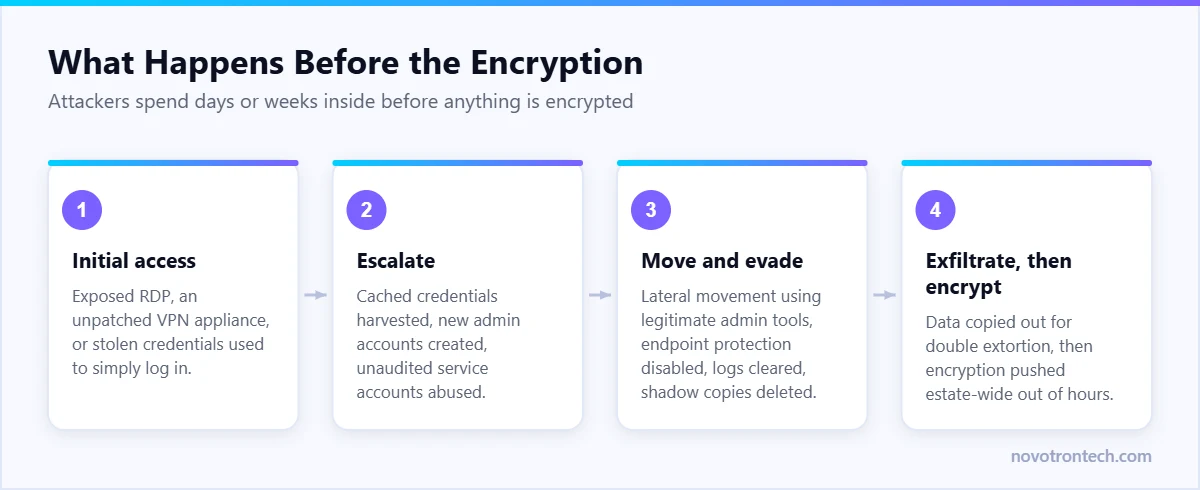
Encryption is the last step, not the first. Attackers typically spend days or weeks inside a network before triggering anything, and that gap is the entire opportunity for detection.
- Reconnaissance. Mapping the domain, file shares, backup servers and finance systems.
- Credential escalation. Harvesting cached credentials, creating new admin accounts, or abusing service accounts that nobody audits.
- Lateral movement. Moving from the first compromised laptop to servers using legitimate administrative tools, which is why antivirus alone rarely notices.
- Defence evasion. Disabling endpoint protection, clearing event logs, deleting shadow copies.
- Exfiltration. Copying data out before encrypting, so the business can be extorted twice — once to decrypt, once to prevent publication.
- Deployment. Encryption pushed across the estate, usually out of hours on a Friday or ahead of a public holiday.
Every one of those steps generates signals: new admin accounts, mass file access, security tooling disabled, large outbound transfers. Whether anyone sees them depends on having someone watching.
Prevention Controls, in Priority Order
Budget is finite, so sequence matters. This order reflects risk removed per rupee spent.
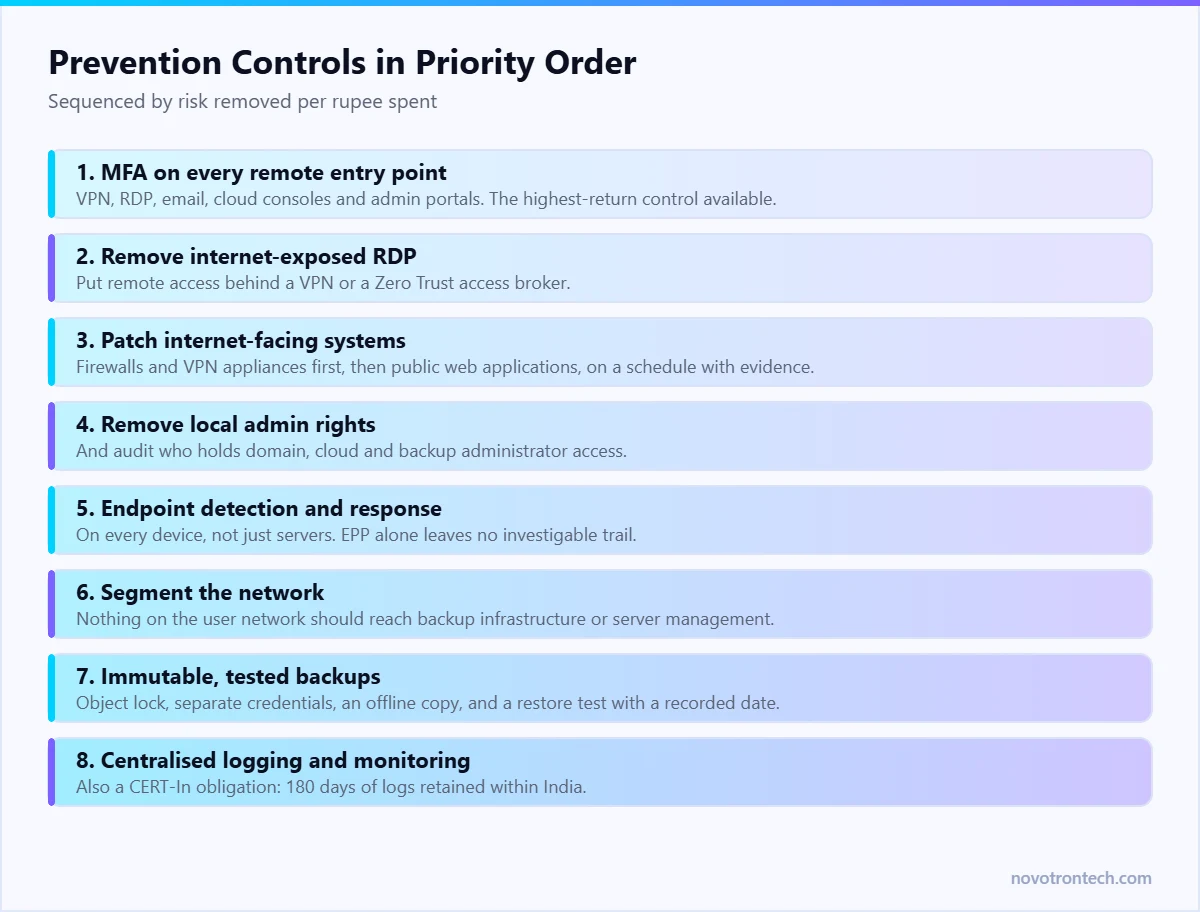
- 1. MFA on every remote entry point. VPN, RDP, email, cloud consoles and any administrative portal. Nothing else on this list removes as much risk for as little money.
- 2. Remove internet-exposed RDP. Put remote access behind a VPN or a Zero Trust access broker — the approach explained in Zero Trust security.
- 3. Patch internet-facing systems on a schedule, with evidence. Firewalls and VPN appliances first, then public web applications.
- 4. Remove local administrator rights from standard users, and audit who holds domain and cloud admin.
- 5. Deploy endpoint detection and response on every device, not just servers. See endpoint security for the difference between EPP and EDR.
- 6. Segment the network. Workstations should not reach server management interfaces, and nothing on the user network should reach the backup infrastructure — covered in network security.
- 7. Harden email. Filtering, attachment controls, macro blocking, and payment-change verification by phone.
- 8. Centralised logging and monitoring, which is also a CERT-In obligation — see CERT-In compliance in India.
Backups: the Part That Decides Recovery
Attackers target backups deliberately, because a business that can restore does not pay. If your backup server is domain-joined and reachable from a compromised workstation, assume it is encrypted too.
The rule worth applying
Keep three copies of data on two different media, with one copy off-site, one copy offline or immutable, and zero errors in the last restore test. The last two are the ones most businesses skip.
What immutable actually means
- Object lock or WORM storage where a backup cannot be deleted or altered until its retention period expires, even by an administrator.
- Separate credentials. Backup infrastructure should not authenticate against the same directory as everything else. Compromised domain admin should not equal compromised backups.
- An air-gapped or offline copy for the systems that would stop the business.
- Restore tests with a recorded date. A green tick in a console is a job status, not proof of recoverability. Guidance on designing this properly is in backup as a service.
The First Six Hours of a Ransomware Incident
The order of actions in the first few hours determines both how much is lost and whether you can meet your legal obligations.
- Isolate, do not shut down. Disconnect affected hosts from the network but leave them powered on where possible; memory and logs are evidence.
- Disable compromised accounts and force credential resets for privileged users.
- Protect the backups first. Take the backup repository offline or verify its immutability before anything else spreads.
- Start the CERT-In clock. A qualifying incident must be reported within six hours of noticing it, complete or not.
- Assess personal data exposure. If personal data is involved, DPDP notification to the Data Protection Board and to affected individuals is a separate obligation with its own timeline — see the DPDP compliance checklist.
- Preserve logs. Export firewall, identity and endpoint logs before retention windows roll over.
- Communicate internally. One named incident lead, one channel, no speculation to customers until scope is known.
Should You Pay?
Paying is a business decision with poor odds and real legal risk, and it should be treated as a last resort rather than a recovery plan.
- Decryption tools supplied by attackers are frequently slow, incomplete or corrupt large files. Paying does not guarantee full recovery.
- Payment does not remove exfiltrated data. Extortion often continues after a ransom is paid.
- Payment marks the business as willing to pay, which materially raises the chance of a repeat attack.
- Payments may route to sanctioned entities, creating exposure under Indian and international law. Take legal advice before any payment discussion, and involve your insurer if you carry cyber cover.
The businesses that never face this decision are the ones whose backups were isolated and tested. That is the entire argument for spending on backup design rather than on incident response retainers alone.
A Recovery Sequence That Works
- Contain and confirm scope before rebuilding anything, or you will restore into a network the attacker still controls.
- Rebuild identity first. Domain controllers and directory services, with new credentials and a clean baseline.
- Rebuild rather than clean. Reimage compromised endpoints and servers; do not trust a cleaned host.
- Restore in business-priority order, using the RTO and RPO targets you set in advance — the framework is in disaster recovery vs business continuity.
- Close the entry route before reconnecting. Patch, rotate credentials, disable the exposed service.
- Monitor intensively afterwards. Re-entry attempts in the weeks after recovery are common.
What Readiness Costs Compared With Recovery
For a 100-device business in Delhi NCR, the preventive stack — EDR across endpoints, MFA, immutable backup with off-site copy, and managed monitoring — typically lands in the region of ₹60,000 to ₹1,50,000 per month depending on coverage, with managed SOC pricing the largest variable.
Recovery from a serious incident without tested backups is measured differently: a week or more of lost operations, emergency forensics and rebuild work billed at premium rates, contractual penalties, regulatory exposure under CERT-In and the DPDP Act, and the cost of telling customers. Any one of those usually exceeds a year of the preventive spend.
Testing: The Step Everyone Skips
- Quarterly restore test. Restore a real system to a clean environment and confirm it runs. Record the date and the time taken.
- Annual tabletop exercise. Walk a simulated incident through detection, isolation, CERT-In reporting and customer communication, with the actual people who would do it.
- Periodic penetration testing focused on external exposure and lateral movement paths.
- Phishing simulation to measure and reduce click rates rather than assume them.
- Access review. Every quarter, list domain, cloud and backup administrators and justify each one.
Frequently Asked Questions
What is the best protection against ransomware?
There is no single control. The highest-return combination is MFA on all remote access, patched internet-facing systems, no local admin rights, endpoint detection and response, network segmentation, and immutable or offline backups that are restore-tested. Backups determine whether an incident is a bad week or an existential event.
Do we have to report a ransomware attack in India?
Yes. Ransomware is an explicitly reportable incident under the CERT-In Directions and must be reported within six hours of being noticed. If personal data is affected, the DPDP Act separately requires notification to the Data Protection Board and to affected individuals.
Will antivirus stop ransomware?
Not reliably on its own. Antivirus blocks known malicious files, but most modern attacks use stolen credentials and legitimate administrative tools for the steps before encryption. Endpoint detection and response is needed to see and investigate that activity.
Are cloud backups safe from ransomware?
Only if they are immutable and use separate credentials. A cloud backup that a compromised domain administrator can delete offers no more protection than a local one. Object lock, separate authentication and a tested restore are what make a backup ransomware-resistant.
Should a business pay the ransom?
It should be a last resort. Decryption is often incomplete, payment does not remove exfiltrated data, it raises the likelihood of repeat targeting, and it may create legal exposure if funds reach sanctioned entities. Take legal advice and involve your insurer before any payment discussion.
How long does ransomware recovery take?
With isolated, tested backups and a documented plan, critical systems are often back within days. Without them, recovery routinely runs into weeks because identity infrastructure has to be rebuilt before anything else can be restored safely.
How much does ransomware protection cost in India?
For a business with around 100 devices, a preventive stack covering EDR, MFA, immutable backup with an off-site copy and managed monitoring typically runs between ₹60,000 and ₹1,50,000 per month, with monitoring coverage the main variable.
Getting Ransomware-Ready
Most businesses discover their gaps during an incident, when the options are expensive. Novotron works with organisations across Noida and Delhi NCR to close them beforehand — access hardening, endpoint detection, segmentation, immutable backup design and 24×7 monitoring, with restore tests and tabletop exercises to prove the plan works. Call +91 81300 09878 or email sales@novotrontech.com.