
Quick Answer
Setting up IT for a new office in Noida takes about six to eight weeks from signing the lease, and the long pole is almost always connectivity — an internet leased line takes three to six weeks to provision, so it has to be ordered first. For a 50-seat office, expect roughly ₹18–35 lakh in one-time capital spend (devices, network hardware, cabling, UPS, server or cloud setup) and ₹1.5–3.5 lakh per month in running cost (connectivity, licences, support and security). Order the leased line, then design the network, then buy endpoints — in that sequence.
The Timeline That Actually Works
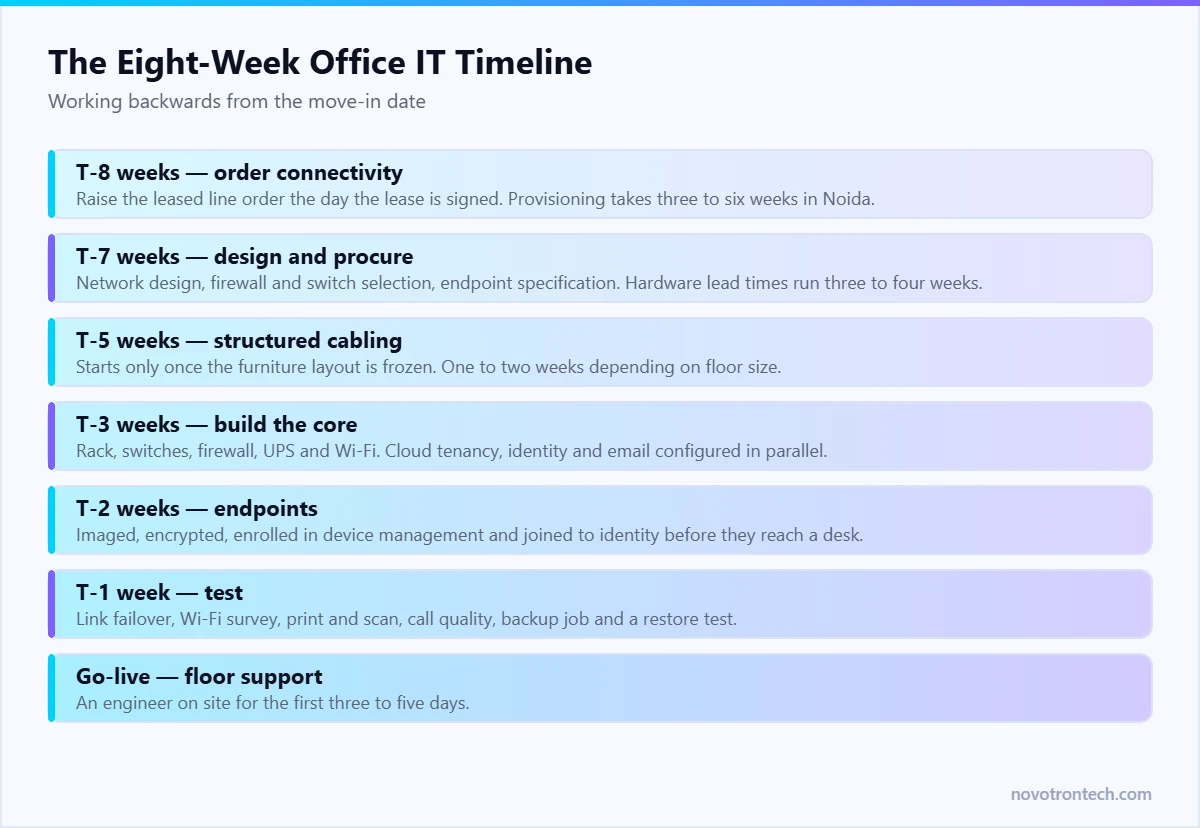
Work backwards from the move-in date. The dates below assume a standard commercial floor in a Sector 62, 132, 135 or 142 building with existing riser access.
- T-8 weeks — order connectivity. Raise the leased line order and a secondary broadband link the day the lease is signed. Provisioning, feasibility survey and last-mile work routinely take three to six weeks in Noida, and nothing else can be commissioned without it.
- T-7 weeks — design and procure. Finalise the network design, firewall model, switch count, access point layout and endpoint specification. Lead times on enterprise firewalls and switches can run three to four weeks.
- T-5 weeks — structured cabling. Cabling has to follow the furniture layout, so it cannot start until the fit-out plan is frozen. Allow one to two weeks depending on floor size.
- T-3 weeks — build the core. Rack, patch panels, switches, firewall, UPS and Wi-Fi controller installed and configured. Cloud tenancy, identity and email configured in parallel.
- T-2 weeks — endpoints. Laptops and desktops imaged, enrolled into device management, encrypted and joined to identity before they reach a desk.
- T-1 week — test. Link failover, Wi-Fi coverage survey, print and scan, VoIP call quality, backup job, and a restore test.
- Go-live week — floor support. An engineer on site for the first three to five days. Day-one issues are inevitable; unattended day-one issues become week-one escalations.
Connectivity: Get This Right and the Rest Follows
Almost every painful new-office IT story starts with connectivity ordered too late or specified too thin.
What to order
- A primary internet leased line (ILL) — symmetric bandwidth with an SLA. In Delhi NCR, a symmetric 50 Mbps line typically runs around ₹14,000–₹22,000 per month, with 100 Mbps commonly about 1.7 times that. Add 18% GST.
- One-time charges of roughly ₹5,000–₹15,000 for installation and ₹15,000–₹30,000 for router or CPE hardware, often waived on longer terms. Three-year contracts typically price 15–25% below monthly-term rates.
- A secondary link from a different provider on a different last mile. A broadband failover costs a fraction of the primary and prevents a single fibre cut from stopping the office.
- Static IPs if you host anything, run site-to-site VPN, or need allow-listing with a client.
How much bandwidth
For an office running cloud email, SaaS applications and video calls, plan roughly 1.5–2 Mbps of symmetric bandwidth per concurrent user, then round up. A 50-seat office is comfortable on 100 Mbps symmetric; 50 Mbps works if video usage is light. Under-provisioning is a false economy — the complaint it generates is constant and the upgrade costs a change order.
Network and Security, Designed Together
Retrofitting security into a network that is already live is several times more expensive than building it in during the fit-out, when nothing is in production and nobody is inconvenienced.
- Next-generation firewall with intrusion prevention, sized for the link speed plus growth headroom, and a support contract that includes hardware replacement.
- Managed switching with enough PoE ports for access points, cameras and IP phones, plus 25–30% spare capacity.
- VLAN segmentation from day one — staff, guests, IoT and cameras, servers, and management each on their own segment. This is the single cheapest security control available during a fit-out. The reasoning is set out in network security.
- Wi-Fi designed from a survey, not from a floor-plan guess. Concrete cores and glass cabins in Noida towers cause more dead zones than access point count does.
- Guest Wi-Fi fully isolated from the corporate network, with its own bandwidth cap.
- Remote access via VPN or a Zero Trust broker — never RDP published to the internet. See Zero Trust security.
Servers or Cloud?
For most new offices the answer is cloud for everything except what genuinely has to be local. A local server room means power, cooling, physical security, hardware refresh and someone to run it. Keep on-premise only for file services with heavy local access, licence-bound applications, and anything tied to on-site equipment.
If you do keep a rack: budget for a UPS sized for a controlled shutdown rather than hours of runtime, a dedicated air-conditioning unit, and physical access control on the room. If you are moving workloads from an old office rather than starting fresh, the sequencing in our cloud migration guide applies.
Endpoints, Identity and Day-One Governance
- Standardise on two or three device models. Mixed fleets multiply imaging, spares and support effort for no benefit.
- Image and enrol before delivery. Every device joined to identity, encrypted, enrolled in device management and carrying endpoint protection before it reaches a desk.
- Full-disk encryption with escrowed recovery keys, so a lost laptop is an inconvenience rather than a data breach.
- MFA enforced from day one. Retrofitting it later is a change-management project; on day one it is simply how the office works. See why MFA is essential.
- No local administrator rights as the default, with a documented exception process.
- Joiner-mover-leaver process written down before the first hire, or account sprawl starts in month one — the basis of identity and access management.
Power, Physical and the Things People Forget
- UPS on the network rack, not just on servers. A firewall without power takes the whole floor offline regardless of the building generator.
- Confirm generator backup and changeover time with building management, and test it before go-live.
- CCTV and access control on the server or network room, on their own network segment.
- Labelled cabling and a port map. Ten minutes of labelling during the fit-out saves hours on every future fault.
- Spares on site — a switch, access point, a few patch leads and two spare laptops. Same-day replacement in Noida is realistic; same-hour is not.
- Printing and scanning tested with real documents, on the segmented network, before anyone moves in.
Compliance From Day One
Two Indian obligations are far cheaper to build in during a fit-out than to add later. Under the CERT-In Directions, security logs must be retained for 180 days within India and system clocks synchronised to Indian NTP sources — decide the logging destination and retention while you are configuring the firewall, not a year afterwards. See CERT-In compliance in India. Under the DPDP Act, access control, retention limits and breach detection over personal data all sit with whoever runs the infrastructure; the DPDP compliance checklist sets out what IT owns.
Indicative Budget by Office Size
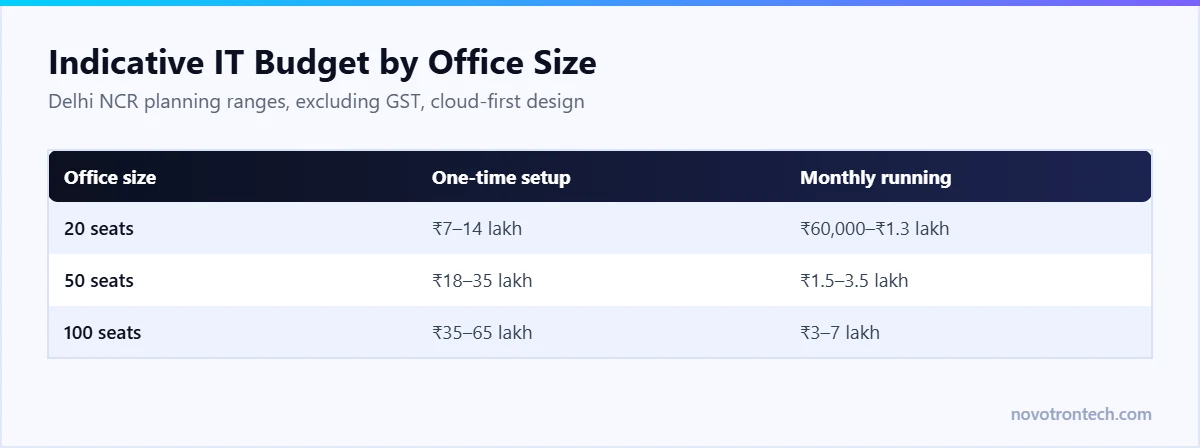
Figures below are planning ranges for Delhi NCR, excluding GST, assuming a cloud-first design with no on-premise server room.
- 20 seats. One-time roughly ₹7–14 lakh — endpoints, firewall, switch, access points, cabling, UPS and setup. Monthly roughly ₹60,000–₹1.3 lakh — connectivity, licences, support and security.
- 50 seats. One-time roughly ₹18–35 lakh. Monthly roughly ₹1.5–3.5 lakh.
- 100 seats. One-time roughly ₹35–65 lakh, with structured cabling and Wi-Fi design becoming a larger share. Monthly roughly ₹3–7 lakh.
The widest variable is endpoint specification — an engineering team on high-specification laptops can double the device line alone. Ongoing support is the other: an AMC is cheaper per device than a managed contract but covers repair rather than prevention, and the comparison is worked through in IT AMC vs managed IT services. Per-user managed pricing for Noida is broken down in managed IT services in Noida.
Mistakes That Cost the Most
- Ordering connectivity last. It is the longest lead time and it blocks everything else.
- Cabling before the furniture layout is frozen. Re-cabling after desks move is pure rework.
- A flat network. Cheap to build, expensive the first time anything is compromised.
- No secondary internet link. One fibre cut then stops the entire office.
- Buying endpoints before deciding identity and device management. Machines then get imaged twice.
- Treating security as a phase two. MFA, endpoint protection and backup cost far less to enable on day one than to introduce across a working office.
- No day-one on-site support. Small issues on move-in day compound quickly.
Frequently Asked Questions
How long does it take to set up IT for a new office in Noida?
Around six to eight weeks from lease signature. The critical path is the internet leased line, which typically takes three to six weeks to provision, followed by cabling, network build and endpoint imaging.
How much does IT setup cost for a 50-person office in India?
Plan for roughly ₹18–35 lakh in one-time cost covering endpoints, firewall, switching, access points, cabling and UPS, plus roughly ₹1.5–3.5 lakh per month for connectivity, licences, support and security. Endpoint specification is the largest variable.
What internet connection does a new office need?
A symmetric internet leased line with an SLA as the primary link, plus a broadband failover from a different provider on a different last mile. In Delhi NCR a symmetric 50 Mbps line typically costs around ₹14,000–₹22,000 per month before GST, with 100 Mbps commonly about 1.7 times that.
Should a new office buy servers or use cloud?
Cloud-first for most businesses. Keep on-premise only for file services with heavy local access, licence-bound applications, or systems tied to on-site equipment. A local rack adds power, cooling, physical security and hardware refresh costs.
What should be set up first?
Connectivity. Order the leased line the day the lease is signed, because its provisioning time is longer than everything else combined. Network design and procurement follow, then cabling, then endpoints.
Do we need a firewall for a small office?
Yes. A next-generation firewall with intrusion prevention is the boundary control for the whole floor, and it is also where segmentation and logging are configured. Consumer routers provide none of that.
Can one IT provider handle the whole setup?
Yes, and it is usually cheaper than splitting it. A single partner covering connectivity coordination, network design, cabling, endpoint imaging, identity, security and go-live support removes the handoffs that cause delays on move-in day.
Planning an Office Move in Noida
Novotron sets up and runs IT for offices across Noida and Delhi NCR from its own office at Aycon Tower, Sector 135 — connectivity coordination, network and Wi-Fi design, structured cabling, endpoint rollout, identity and security baseline, and on-site support through go-live. If you have a lease signed or a date in mind, call +91 81300 09878 or email sales@novotrontech.com and we will work backwards from your move-in date.
Read next: where the offices are in our map of IT companies in Noida Sector 62, and how to choose an IT company in Noida to run it.