
Quick Answer: What Data Loss Prevention Costs in India
Data loss prevention in India typically costs ₹700 to ₹3,500 per user per year, depending on how many channels you cover. Consequently, a 150-person company usually budgets ₹1–5 lakh a year for licences. In addition, expect a one-time rollout and tuning project of ₹1.5–6 lakh, because data loss prevention only works after somebody classifies your data and tunes the rules.
However, the licence is rarely what decides success. Instead, the outcome depends on whether you know which data matters. This guide explains how data loss prevention works, where it runs, what it genuinely costs in India, and why so many rollouts stall.
What Data Loss Prevention Actually Does
Data loss prevention watches sensitive information as it moves and stops it leaving in ways you did not intend. In practice, that means three actions.
- Discover. Find sensitive data wherever it already sits, including old file shares nobody has opened for years.
- Classify. Label what matters, such as Aadhaar numbers, PAN details, bank records, salary data, source code or client contracts.
- Control. Apply rules when that data moves, whether by email, upload, USB drive, chat app or print.
Importantly, control does not always mean blocking. Frequently the better first response is to warn the user, log the event, or require a business justification. Because of that, a well-run data loss prevention programme starts by watching rather than stopping.
Why Data Loss Prevention Moved Up the Agenda in India
The regulatory picture changed, and it changed quickly.
India’s Digital Personal Data Protection Rules were notified in November 2025, and penalty enforcement begins in May 2027. Failure to apply reasonable security safeguards carries penalties reaching ₹250 crore. Meanwhile, failure to notify the Data Protection Board and affected individuals carries penalties reaching ₹200 crore. Separately, CERT-In still expects incident reporting within six hours.
Therefore two questions now matter commercially. Firstly, do you know what personal data you hold? Secondly, could you tell a regulator what left the building, and when? Data loss prevention answers both, which is why enterprise buyers increasingly ask about it in security questionnaires. Our DPDP Act compliance checklist sets out the wider obligations.
The Three Places Data Loss Prevention Runs
Vendors sell many names, yet the technology sits in only three places. Furthermore, most Indian businesses need two of the three rather than all of them.
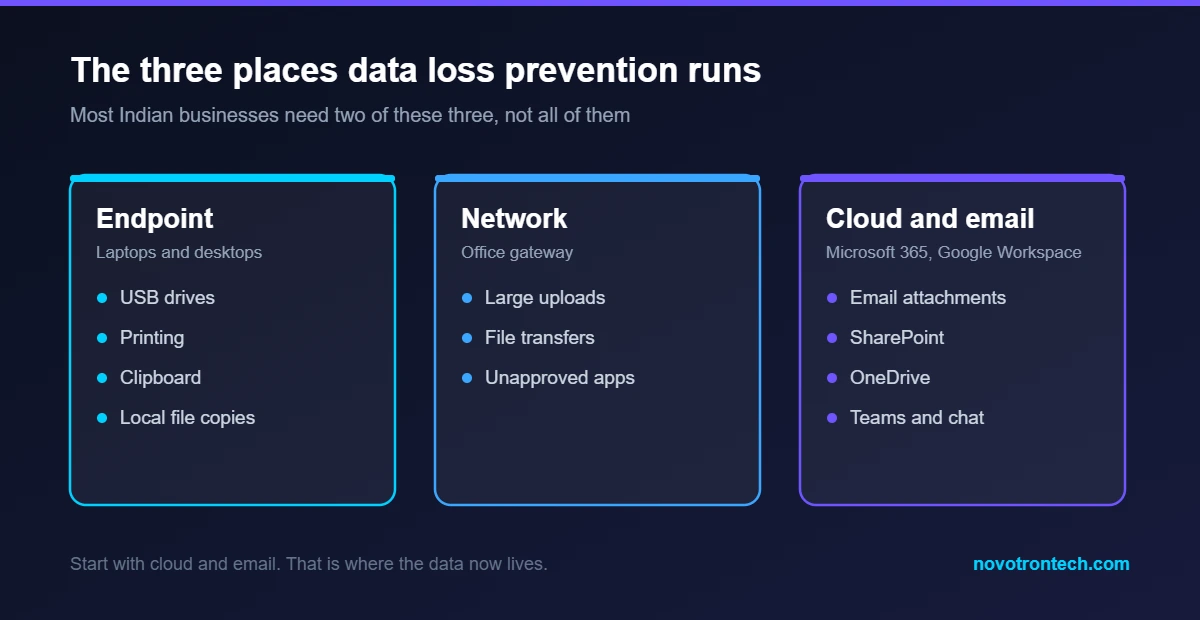
Endpoint data loss prevention
An agent runs on laptops and desktops. It sees USB drives, printing, clipboard activity and files copied into personal cloud folders. Consequently, endpoint coverage matters most where staff work offline or carry company laptops home.
Network data loss prevention
A gateway inspects traffic leaving your office network. It catches large uploads and unapproved file transfers. Nevertheless, its value has fallen as staff moved to home working and encrypted apps, so treat it as a supporting layer.
Cloud and email data loss prevention
Rules run inside Microsoft 365, Google Workspace and your storage platforms. This is where most Indian companies should start, simply because that is where the data now lives. Moreover, the tooling is often already included in licences you own.
For example, Microsoft 365 Business Premium and the E3 and E5 tiers include useful data loss prevention capability. Many companies pay twice without realising it. Before buying anything, check what your existing licence already covers. Our note on Microsoft 365 backup makes a similar point about assumed protection.
Data Loss Prevention Pricing in India
Pricing follows channels covered and how much automation you want. As a result, quotes vary widely for what sounds like the same product.
| Deployment | Typical India price | What it covers |
|---|---|---|
| Built into Microsoft 365 or Google Workspace | Often included in existing licences | Email, SharePoint, OneDrive, Teams |
| Cloud and email data loss prevention | ₹700–1,500 per user per year | SaaS apps, email, cloud storage |
| Endpoint data loss prevention | ₹1,200–2,500 per user per year | USB, print, clipboard, local files |
| Full multi-channel platform | ₹2,500–3,500 per user per year | Endpoint, network, cloud and discovery |
| Rollout, classification and tuning | ₹1.5–6 lakh one-time | Data discovery, policy design, pilot and handover |
Internationally, published list prices land between roughly $34 and $71 per user per year for single-channel products, while full deployments commonly reach $75–150 per employee annually. Indian pricing usually sits below those figures, particularly when a local partner bundles the rollout.
Costs that quotes leave out
- Policy tuning. Budget several weeks. False positives fall only with iteration.
- Data classification effort. Somebody in the business must decide what counts as sensitive.
- Incident handling. Alerts need an owner, otherwise they accumulate unread.
- Change management. Staff need to understand why a warning appeared.
- Integration. Feeding events into a SIEM or service desk costs time.
How a Data Loss Prevention Rollout Should Go
Successful projects follow the same shape. Above all, they resist the urge to block anything in the first month.
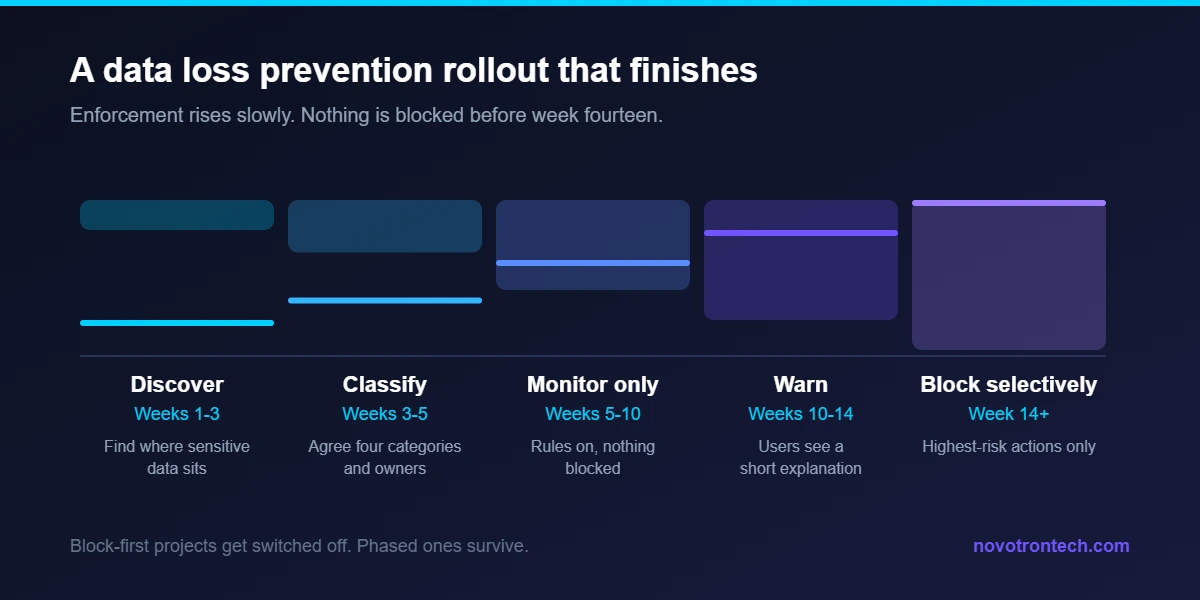
Phase 1: Discover, weeks 1 to 3
First, scan your file shares, mailboxes and cloud storage to find where sensitive data actually sits. Almost every organisation finds surprises here. Old HR folders and forgotten project shares are the usual ones.
Phase 2: Classify, weeks 3 to 5
Next, agree what matters. Keep the list short at the start. Four or five categories work far better than twenty, because every extra category multiplies the tuning effort later.
Phase 3: Monitor only, weeks 5 to 10
Then turn the rules on in observation mode. Nothing is blocked. Instead, you learn how your business genuinely moves data, and you discover which rules would have fired incorrectly.
Phase 4: Warn, weeks 10 to 14
After that, start showing users a warning with a short explanation. Many people simply stop and rethink. Additionally, this phase surfaces the legitimate workflows that need an exception.
Phase 5: Block selectively, week 14 onwards
Finally, block only the highest-risk actions, such as bulk customer data leaving to a personal email address. Everything else stays on warn or log. Consequently users keep working and the security team keeps credibility.
Why Most Data Loss Prevention Projects Fail
The technology rarely fails. Rather, the rollout does. Four patterns account for almost every stalled project we see.
- Blocking on day one. Aggressive rules break legitimate work within hours. Then the business demands the tool be switched off, and it usually wins.
- No data owner. Security teams cannot decide what is confidential in a finance report. Only the business can.
- Too many categories. Twenty classifications generate noise nobody triages.
- Nobody owns alerts. A data loss prevention console with 4,000 unread events is worse than none, because it creates a false sense of coverage.
Therefore, staff one named owner before you buy anything. That single decision predicts success better than any product comparison.
Data Loss Prevention, Backup and Encryption Are Not the Same
Buyers regularly confuse these three. In fact, they solve completely different problems.
| Control | Problem it solves | What it will not do |
|---|---|---|
| Data loss prevention | Data leaving in ways you did not intend | Bring data back after deletion |
| Backup | Deletion, corruption and ransomware | Stop somebody emailing a client list out |
| Encryption | Readability if a device or file is stolen | Stop an authorised user sharing the file |
| Identity and access management | Who can reach the data at all | Watch what they do once inside |
Ideally you run all four. Nonetheless, if you can only do one thing this quarter, tighten access first. Fewer people with access means less data to police.
Classification: The Work Nobody Wants to Do
Every data loss prevention programme depends on classification, and classification is a business exercise rather than a technical one. Fortunately it does not need to be exhaustive.
Start with four categories. Firstly, personal data covered by the DPDP framework, such as customer records and employee files. Secondly, financial records including invoices, payroll and bank details. Thirdly, intellectual property such as source code, designs and pricing models. Fourthly, contractual material covered by client confidentiality terms.
Then assign an owner to each category. That owner decides what may leave, to whom, and under what conditions. Without that decision, your data loss prevention rules become guesses written by people who do not know the business.
Automatic classification helps, up to a point
Modern tools recognise Aadhaar numbers, PAN formats, credit card patterns and IFSC codes automatically. Nevertheless, they cannot tell a routine internal spreadsheet from a confidential board pack. Consequently, a mix of automatic detection and manual labelling works best.
What Good Data Loss Prevention Rules Look Like
Rules should describe business risk, not file types. Here are five that work in Indian mid-market companies.
- Block bulk export of customer records to personal email domains, while allowing single records with a justification.
- Warn when files containing PAN or Aadhaar patterns are uploaded to personal cloud storage.
- Log every copy of finance data to removable media, and block it entirely for non-finance staff.
- Require encryption when contracts leave the organisation to an allowlist of client domains.
- Alert immediately when a departing employee downloads unusual volumes in their notice period.
Notice how each rule names a scenario. Broad rules such as “block all spreadsheets” fail within a day, whereas scenario rules survive contact with real work.
What to Prepare Before You Buy
You will get better pricing and a faster rollout with these six answers ready.
- Your user count, and how many carry laptops off site.
- Which cloud platforms you use, including anything a single team bought alone.
- Whether your Microsoft or Google licences already include data loss prevention.
- Who will own alerts day to day, by name.
- Your four data categories and their business owners.
- Any contractual or regulatory obligation driving the project, since that shapes the rules.
With those in hand, a competent partner can scope in days. Vague briefs, on the other hand, produce padded quotes and slow projects. A wider cyber security risk assessment is often the cleanest way to gather them.
The Insider Risk Nobody Plans For
Most real incidents are not dramatic. Typically, somebody takes a client list on their way to a competitor, or emails a spreadsheet home to finish work at night. Both cause the same regulatory problem.
Notice periods deserve particular attention. Departing staff download more in their final month than at any other time, and much of it is genuinely innocent. Nevertheless, a good data loss prevention rule flags unusual volume during that window so a manager can ask a simple question early.
Third parties count too
Contractors, agencies and outsourced finance teams often hold more of your data than employees do. Accordingly, extend your rules to guest accounts and shared channels. Otherwise you protect the front door and leave a side entrance open.
Measuring Whether It Is Working
Data loss prevention is easy to buy and hard to prove. Consequently, agree the measures before you start.
| Measure | Why it matters | Healthy direction |
|---|---|---|
| Sensitive data locations | Shows discovery is working | Falling, as old copies are removed |
| False positive rate | Shows tuning quality | Under 10% within three months |
| Warnings acted on by users | Shows behaviour change | Rising steadily |
| Blocked high-risk events | Shows real exposure prevented | Small and stable, not growing |
| Time to triage an alert | Shows the process has an owner | Under one business day |
Above all, watch the false positive rate. A programme that annoys people gets bypassed, and bypassed controls protect nobody. Meanwhile a falling count of sensitive data locations is the clearest sign that discovery produced real cleanup rather than a report.
A Realistic First Ninety Days
For a 150-person Indian company already on Microsoft 365, a sensible first quarter looks like this. Firstly, run discovery across mailboxes, SharePoint and OneDrive during weeks one to three. Secondly, agree four data categories and their owners by week five.
Thirdly, enable monitoring rules with no enforcement, and review the findings weekly. By week ten you will know which rules are noisy. Then move to warning mode, and finally block only bulk customer data leaving to personal domains. Total licence spend for that scope commonly lands near ₹1.5–2.2 lakh a year, with a rollout project around ₹2 lakh.
Crucially, nothing in that plan disrupts daily work. That is why it finishes, whereas block-first projects usually do not.
Frequently Asked Questions
What does data loss prevention cost in India?
Budget ₹700–1,500 per user per year for cloud and email coverage, or ₹2,500–3,500 for a full multi-channel platform. Additionally, allow ₹1.5–6 lakh one-time for discovery, classification and tuning.
Do we already have data loss prevention in Microsoft 365?
Quite possibly. Business Premium and the E3 and E5 tiers include capable rules for email, SharePoint, OneDrive and Teams. Therefore check your licence before buying a separate product.
How long does a data loss prevention rollout take?
Around three to four months to reach selective blocking. Discovery and classification take five weeks, monitoring runs for another five, and warning mode follows before anything is blocked.
Will data loss prevention slow our staff down?
Not if you phase it. Monitoring and warning modes change nothing about how people work. Only the final blocking rules affect a small number of high-risk actions.
Is data loss prevention required under the DPDP Act?
The DPDP framework does not name any specific product. However, it does require reasonable security safeguards, and data loss prevention produces exactly the control evidence and audit trail a regulator would expect.
Does data loss prevention stop ransomware?
No. It limits data being taken out, which helps with extortion based on stolen data. Recovery still depends on tested backups.
Can a small company run data loss prevention without a security team?
Yes, provided the scope stays narrow and a partner handles tuning and alert triage. A 40-person firm covering only email and cloud storage can run a useful programme comfortably.
How does this relate to ISO 27001?
Data loss prevention supports several technological controls in the standard, particularly around information transfer and access. Our guide to the ISO 27001 certification cost in India explains where those controls sit.
Getting Started With Data Loss Prevention
Novotron designs and runs data loss prevention programmes for businesses across Noida and Delhi NCR from our office at Aycon Tower, Sector 135, Noida. We start with discovery and classification, run the monitoring phase properly, and hand over rules your team can actually maintain. To scope your own position, see our DLP security services, read more on cloud and data protection, or call +91-8130009878. You can also email sales@novotrontech.com.