
Most server breaches do not start with a clever exploit. Instead, they start with a default that nobody changed: an RDP port open to the internet, a service account with a password from 2019, SMBv1 still enabled because an old printer needed it, or a Linux box whose last patch predates the current CVE. A server hardening checklist is the discipline of removing those defaults before an attacker finds them. This one is written for 2026, so it covers Windows Server and Linux side by side, and maps every step to the standards Indian organisations are actually audited against: CIS Benchmarks, NIST SP 800-123, ISO 27001 Annex A, and the CERT-In Cyber Security Directions of 2022.
What server hardening is, and why the checklist keeps growing
A server hardening checklist exists to reduce a server’s attack surface to the minimum required for its role, and then to prove that the configuration stays that way. The idea is old; in fact, NIST published SP 800-123, its general server security guide, in 2008. What changed, however, is the environment around the server. For example, ransomware operators now automate the discovery of exposed services, Windows Server 2025 shipped with stronger defaults that break legacy assumptions, and Indian regulators expect evidence, not intent. CERT-In requires organisations to keep 180 days of logs within India and to report qualifying incidents within six hours, which is impossible if the server’s clock, logging and audit policy were never configured. As a result, a 2026 server hardening checklist has to cover the operating system, the identity layer and the evidence trail together.
How server hardening actually works
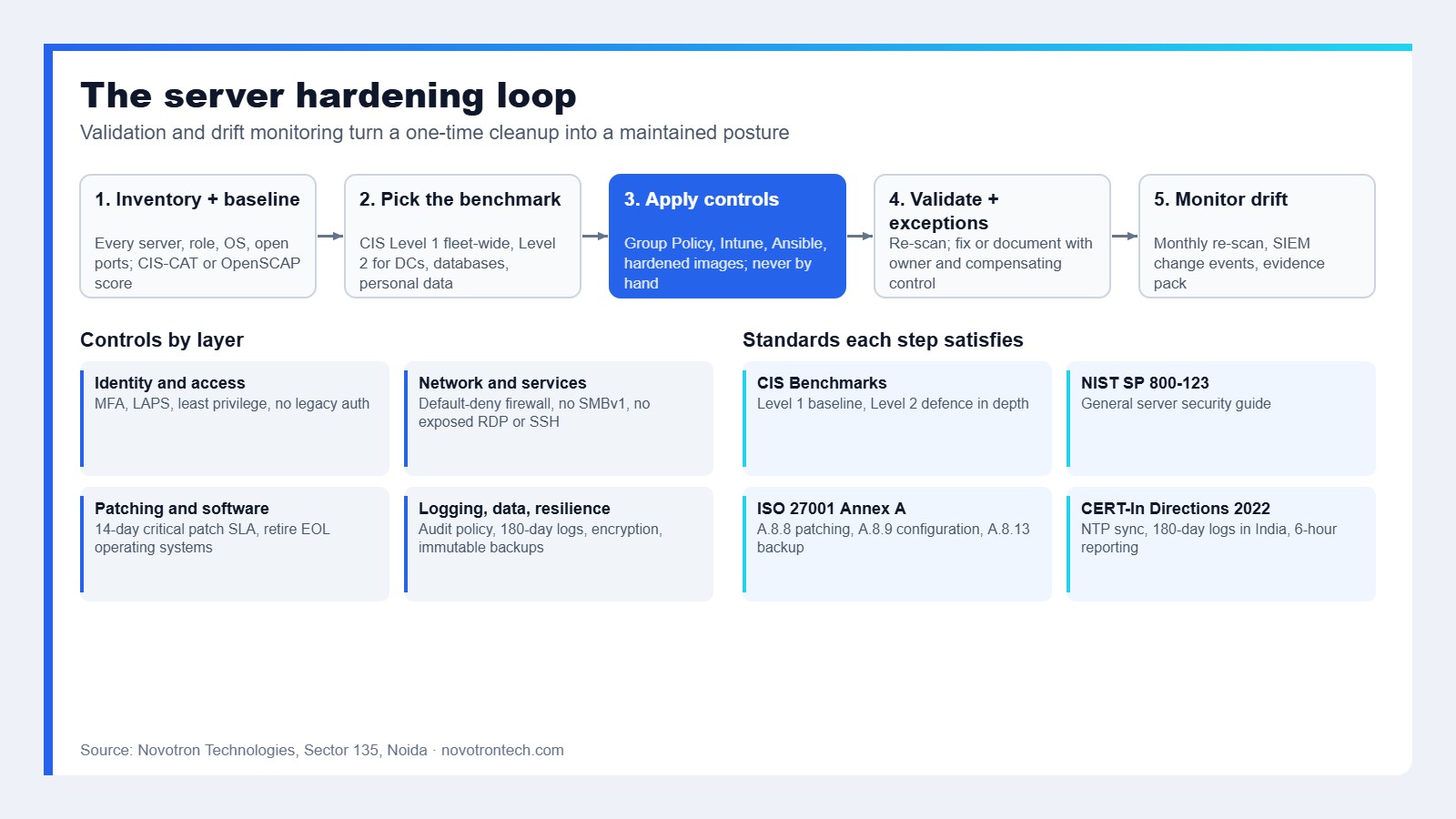
A server hardening checklist is a loop, not a one-time script. Below is the workflow Novotron follows on client servers, and it is worth understanding first, because every step in the list belongs to one of these stages.
Input: inventory and baseline
First, you cannot harden what you have not listed. So the first stage enumerates every server, its role, operating system version, exposed ports and installed services, and then captures a configuration baseline. For example, tools such as the CIS-CAT assessor, OpenSCAP on Linux, or Microsoft’s Security Compliance Toolkit produce a scored starting point.
Processing: benchmark selection
CIS Benchmarks come in two levels. Level 1 is the practical minimum, so it rarely breaks applications. Level 2 is defence-in-depth for high-value or regulated systems and can affect compatibility. Most organisations apply Level 1 everywhere and Level 2 to domain controllers, database servers and anything that holds personal data under the DPDP Act.
Technology: configuration changes
Apply changes through Group Policy or Intune on Windows, and through Ansible, Puppet or hardened images on Linux, so they are repeatable. Otherwise, manual changes on individual servers are how drift begins.
Decision layer: validation and exceptions
After the changes, run the same scanner again. Fix anything still failing, or record it as a documented exception with a compensating control and an owner. Auditors accept exceptions; however, they do not accept silence.
Monitoring: drift and evidence
Scheduled re-scans and change events forwarded to a SIEM detect configuration drift. Together, the scan reports, exception register and log retention form the evidence pack for ISO 27001, CERT-In and DPDP audits.
Server hardening checklist: 25 steps for Windows and Linux
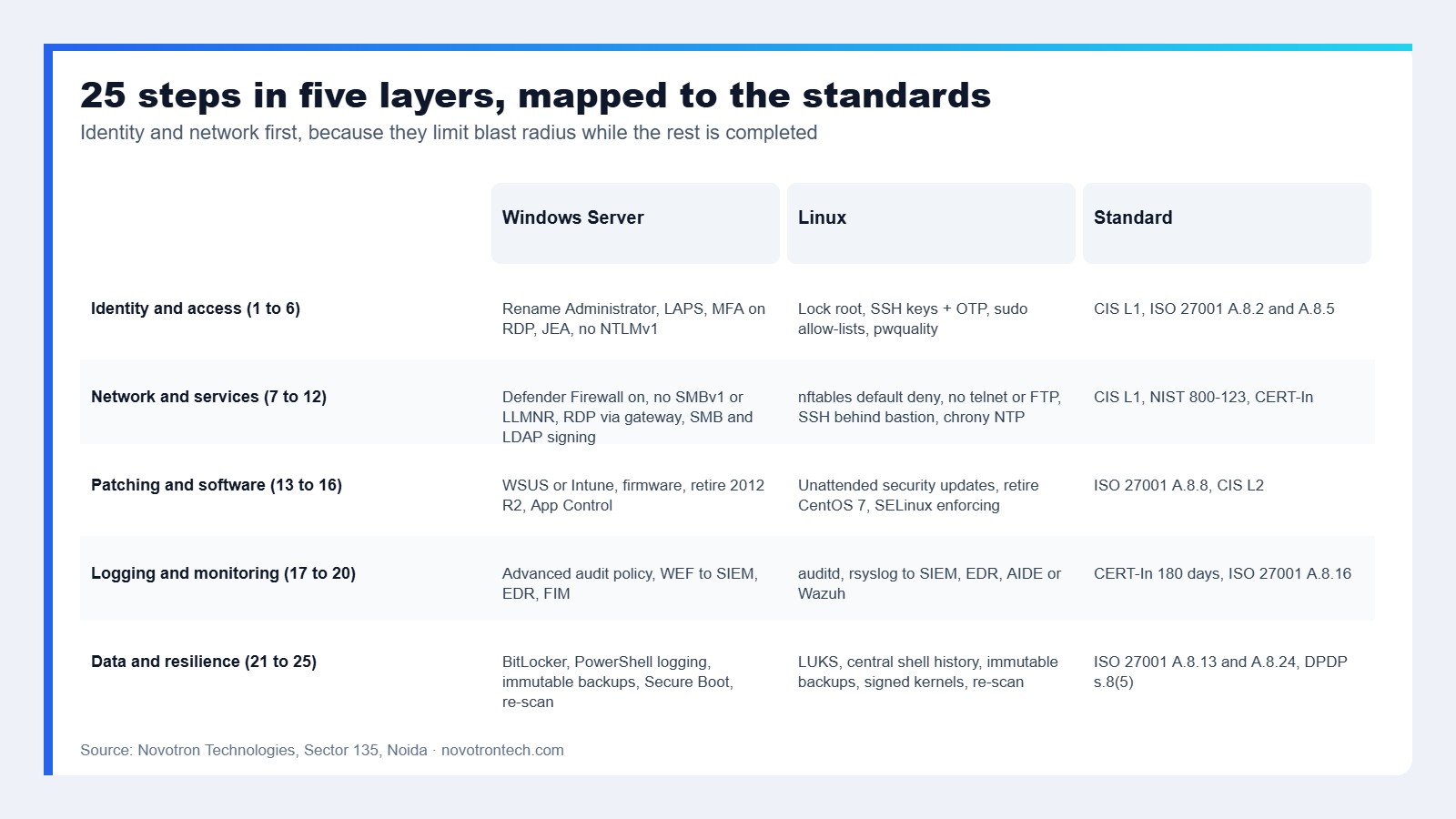
The server hardening checklist below is grouped by layer. Each one names the Windows and Linux implementation, as well as the standard it satisfies. Apply them in order; identity and network controls first, because they limit the damage while the rest is in progress.
Identity and access: server hardening checklist steps 1 to 6
| # | Step | Windows Server | Linux | Standard |
|---|---|---|---|---|
| 1 | Remove or rename default accounts and disable the built-in Guest | Rename Administrator, then disable Guest via GPO | Lock root for SSH, then remove unused system users | CIS L1, NIST 800-123 |
| 2 | Enforce MFA for all administrative access | Either Windows Hello for Business, a smart card or third-party MFA on RDP | SSH keys, as well as PAM-based OTP for privileged users | ISO 27001 A.8.5, CERT-In |
| 3 | Manage local admin passwords centrally | Windows LAPS, because it is built into Server 2019 onwards | Vault-managed root credentials, so each host rotates separately | CIS L1 |
| 4 | Apply least privilege and remove standing admin rights | Tiered admin model, as well as Just Enough Administration for PowerShell | sudo with command allow-lists, so there is no shared root shell | ISO 27001 A.8.2 |
| 5 | Set password and lockout policy | 14+ characters, then lockout after 10 attempts, and never reversible encryption | pam_pwquality as well as faillock and password ageing | CIS L1 |
| 6 | Disable legacy authentication | Disable NTLMv1 and LM hashes, but audit NTLM before restricting it | Disable SSH password auth, then permit only protocol 2 with modern ciphers | CIS L1/L2 |
Network and services: server hardening checklist steps 7 to 12
| # | Step | Windows Server | Linux | Standard |
|---|---|---|---|---|
| 7 | Enable and configure the host firewall with default deny inbound | Windows Defender Firewall, with all three profiles on as well | Either nftables or firewalld, always with an explicit allow-list | CIS L1, NIST 800-123 |
| 8 | Remove unused roles, features and packages | Uninstall unneeded roles, and prefer Server Core whenever possible | Remove compilers, dev tools and unused daemons, especially from production | CIS L1 |
| 9 | Disable insecure protocols | Disable SMBv1, LLMNR and NetBIOS over TCP/IP, as well as WDigest | Disable telnet, rsh and FTP, as well as TLS 1.0/1.1 on any listening service | CIS L1 |
| 10 | Never expose management ports to the internet | RDP only through VPN, bastion or Remote Desktop Gateway, always with MFA | SSH behind VPN or bastion, because a non-default port is not a control | CERT-In advisory practice |
| 11 | Require signing and encryption on file and directory traffic | SMB signing (on by default in Server 2025), as well as LDAP signing and channel binding | NFSv4 with Kerberos, and also SMB signing on Samba | CIS L1 |
| 12 | Synchronise time to an approved source | Domain hierarchy, then a stratum source at the top | chrony to trusted NTP, as well as drift alerts | CERT-In Directions (NIC or NPL time source) |
Patching and software: server hardening checklist steps 13 to 16
| # | Step | Windows Server | Linux | Standard |
|---|---|---|---|---|
| 13 | Patch the operating system on a defined cadence | WSUS, Intune or Azure Update Manager, so critical patches land within 14 days | Distribution repositories, as well as unattended security updates where safe | ISO 27001 A.8.8 |
| 14 | Patch third-party software and firmware | Java, browsers and agents, as well as BIOS and iDRAC or iLO firmware | OpenSSL, web servers and database engines, as well as firmware | CIS L1 |
| 15 | Retire unsupported operating systems | Windows Server 2012 R2 is out of support, so plan 2016 migrations too | CentOS 7 and Ubuntu 18.04 are end of life, so migrate | NIST 800-123 |
| 16 | Control what can execute | Either App Control for Business (formerly WDAC) or AppLocker, always in enforce mode | SELinux enforcing or AppArmor profiles, as well as noexec on /tmp | CIS L2 |
Logging and monitoring: server hardening checklist steps 17 to 20
| # | Step | Windows Server | Linux | Standard |
|---|---|---|---|---|
| 17 | Enable advanced audit policy | Logon, account management and object access, as well as process creation with command line | auditd rules for auth, sudo and file changes, as well as execve | CIS L1 |
| 18 | Forward logs off the host and retain 180 days within India | Either Windows Event Forwarding or an agent to the SIEM | Either rsyslog or journald remote to the SIEM | CERT-In Directions 2022 |
| 19 | Deploy endpoint detection and response on servers | Either Defender for Endpoint or an equivalent EDR | EDR agent, especially one with kernel-level visibility | ISO 27001 A.8.16 |
| 20 | Monitor file integrity on critical paths | FIM on system32, as well as config and web roots | Either AIDE or Wazuh FIM on /etc, /bin and web roots | CIS L2 |
Data, backup and resilience: server hardening checklist steps 21 to 25
| # | Step | Windows Server | Linux | Standard |
|---|---|---|---|---|
| 21 | Encrypt data at rest | BitLocker with TPM, and on all volumes | LUKS on data volumes, so long as keys stay outside the host | ISO 27001 A.8.24, DPDP s.8(5) |
| 22 | Harden remote management and scripting | PowerShell Constrained Language Mode and script block logging, as well as WinRM over HTTPS | Restrict cron and at, then log shell history centrally | CIS L1 |
| 23 | Maintain immutable, tested backups | Either an offline or an immutable copy, with restores tested quarterly | The same, but with a separate credential set | ISO 27001 A.8.13 |
| 24 | Set secure boot and firmware protections | UEFI Secure Boot and TPM 2.0, as well as virtualisation-based security | UEFI Secure Boot and signed kernels, as well as lockdown mode | CIS L2 |
| 25 | Document, scan again and schedule drift checks | Either CIS-CAT or the Security Compliance Toolkit, monthly | Either OpenSCAP or Lynis, monthly | All frameworks: evidence |
A practical example
Consider a typical mid-market estate: twelve Windows Server 2019 hosts and six Ubuntu 20.04 hosts at a logistics company preparing for an ISO 27001 audit. Typically, the inventory stage turns up RDP reachable from the internet on one or two hosts, SMBv1 enabled on the file server because a legacy scanner needs it, and no central logging. Next, the hardening plan applies CIS Level 1 through Group Policy and Ansible, moves RDP behind a gateway with MFA, replaces the scanner’s SMBv1 dependency, and forwards all logs to a SIEM with 180-day retention. Afterwards, a second scan shows the fleet moving from a failing CIS score into the 90s, with a handful of documented exceptions. In our experience the auditor’s question is never “are you hardened” but “show me the before and after”, and the two scan reports are that answer.
Windows Server 2025: what the new defaults change in your checklist
Windows Server 2025 is the first version where several long-recommended settings are on by default. SMB signing is required on both client and server connections, NTLM is on a deprecation path, and Windows LAPS is built in. That is welcome; however, it breaks assumptions on mixed estates. For example, legacy NAS devices and older multifunction printers that cannot sign SMB traffic will stop working the day a 2025 host is introduced, so the hardening plan needs a compatibility test before the cutover, not after.
Linux hardening: the mistakes we see most
On Linux, the common failures are not unusual. Someone leaves password authentication on for SSH “just for one account”. Then SELinux stays in permissive mode after an install, because nobody returned it to enforcing. Finally, unattended upgrades get switched off because a kernel update once rebooted a database. The zero trust principle applies here: assume the host is reachable, and make each service prove it should be listening.
Hardening yourself versus a managed hardening service
Every step in this server hardening checklist can be done in-house. The question, however, is whether it stays done. Therefore, the comparison reflects what we see across Novotron’s security hardening engagements and is intended to be fair to both routes.
| Criterion | In-house hardening | Novotron managed hardening |
|---|---|---|
| Baseline and scoring | Depends on tool licences as well as time | CIS-CAT and OpenSCAP scans, so a scored report exists on day one |
| Breaking changes | Usually learned in production | Compatibility testing first, then Level 1 and Level 2 enforcement |
| Repeatability | Often manual, per server | Group Policy as well as Ansible baselines handed over |
| Drift detection | Rarely scheduled | Monthly re-scan, as well as an exception register |
| Compliance evidence | Usually assembled at audit time | Evidence pack maintained for ISO 27001 as well as CERT-In and DPDP |
| Patching | Competes with project work | Included in managed IT services with a defined SLA |
| Cost pattern | Staff time as well as tool licences | Fixed project fee first, then a monthly retainer |
| Best fit | Mature security team with automation already in place | Mid-market estates of 10 to 500 servers without a dedicated hardening owner |
Pros and cons of a managed hardening service
The advantages of having a partner run the server hardening checklist are speed, repeatability and evidence. For instance, a team that has hardened hundreds of servers knows which Level 2 settings will break which applications, so the project does not stall on the first outage. Baselines are delivered as code, so new servers inherit them. Additionally, the scan reports and exception register are exactly what auditors ask for, which shortens ISO 27001 and CERT-In reviews.
Equally, the limitations deserve weight. For example, a service cannot fix an application that only runs on an unsupported operating system; that is a migration decision for you. Hardening also adds friction for administrators, and if you do not bring the in-house team along, exceptions multiply until the baseline is meaningless. Finally, hardening reduces the attack surface but does not replace detection. It should sit alongside managed detection and response, not instead of it.
How we measure success against the server hardening checklist
Novotron does not publish client-level performance figures, so this is the evaluation framework we agree with every client for the server hardening checklist, rather than a benchmark. In each case, the measure maps to an obligation an auditor will ask about.
| Measure | Target | Obligation it evidences |
|---|---|---|
| CIS Benchmark score per server | Above 90 percent Level 1, as well as documented exceptions | ISO 27001 A.8.9 configuration management |
| Internet-exposed management ports | Zero | CERT-In advisories, cyber insurance questionnaires |
| Critical patch age | Under 14 days for critical, then 30 for high | ISO 27001 A.8.8 |
| Log retention and time sync | 180 days in India, as well as all hosts within one second of NTP | CERT-In Directions 2022 |
| Configuration drift events per month | Trending to zero, and every event with an owner | Change management |
| Restore test success | Quarterly, and documented | ISO 27001 A.8.13, DPDP s.8(5) safeguards |
Frequently asked questions
What is a server hardening checklist?
A server hardening checklist is an ordered set of configuration controls that reduce a server’s attack surface: removing default accounts, enforcing MFA, closing unused ports and services, patching, enabling audit logging, encrypting data and maintaining tested backups. In addition, good checklists map each step to a standard such as CIS Benchmarks or NIST SP 800-123 so the result can be audited.
What is the difference between CIS Level 1 and Level 2?
Level 1 settings are the practical baseline that improves security with little risk to functionality. Level 2 settings, in contrast, add defence in depth for high-value or regulated systems and may reduce compatibility or performance. Consequently, most organisations apply Level 1 fleet-wide and Level 2 to domain controllers, databases and servers holding personal data.
How often should a server hardening checklist be re-run?
You apply the baseline once and then verify it continuously. Then re-scan monthly, review exceptions quarterly, and re-baseline whenever a major operating system version such as Windows Server 2025 or a new Ubuntu LTS is introduced.
Does server hardening help with CERT-In compliance?
Yes. Specifically, the CERT-In Directions of April 2022 require time synchronisation to approved sources, 180 days of log retention within India and six-hour incident reporting. Steps 12, 17 and 18 of this checklist implement the first two directly, and reliable logging is what makes six-hour reporting achievable.
Is Windows Server 2025 more secure by default?
It is. For example, SMB signing is required by default, NTLM is being phased out, and LAPS is built in. However, those defaults break legacy devices that cannot sign SMB traffic, so test compatibility before introducing 2025 hosts into an existing domain.
How much does server hardening cost in India?
It depends on server count and operating system mix, as well as whether Level 2 is required. Novotron scopes hardening as a fixed project fee for the baseline and validation, and then an optional monthly retainer for drift monitoring and patching. Our cyber security audit cost guide gives indicative ranges for the assessment stage.
Can a server hardening checklist be automated?
Largely, yes. Group Policy, Intune, Ansible and hardened images apply the server hardening checklist controls; CIS-CAT, OpenSCAP and Lynis verify them. As a result, automation is what keeps the baseline from drifting after the project ends.
Harden your servers before the next audit or the next attacker
If you cannot say today which of your servers expose RDP or SSH, when each was last patched, or whether your logs would survive a CERT-In request, this server hardening checklist is where to start, and Novotron can run it with you. First, our security hardening team in Noida baselines your Windows and Linux estate against CIS Benchmarks, applies the controls through repeatable automation, and hands over the evidence pack your auditors expect. Book a security assessment or call +91-8130009878 to scope it.