
Most firewall incidents we get called into do not start with a weak box. Instead, they start with a strong box that was set up in an afternoon: an “any-any” rule left from go-live, admin access open on the internet, and firmware nobody has touched in a year. That is why firewall setup services matter more than the logo on the appliance.
This guide is for IT heads, founders and operations managers at growing Indian businesses, roughly 20 to 500 people, who are buying or replacing a FortiGate, Sophos Firewall or Palo Alto Networks next-generation firewall. First, it explains what a proper setup includes. Then it walks through how a firewall actually processes traffic, compares the three platforms fairly, and shows how we judge whether a configuration is doing its job.
What firewall setup services actually include
A firewall setup is not the same as racking an appliance and pasting in a default policy. In practice, a complete engagement covers design, build, testing and handover. At Novotron, it sits inside our security hardening services, where network hardening explicitly covers firewall configuration, segmentation, access controls and VPN security.
Here is the scope we recommend any provider should quote against, whoever you hire:
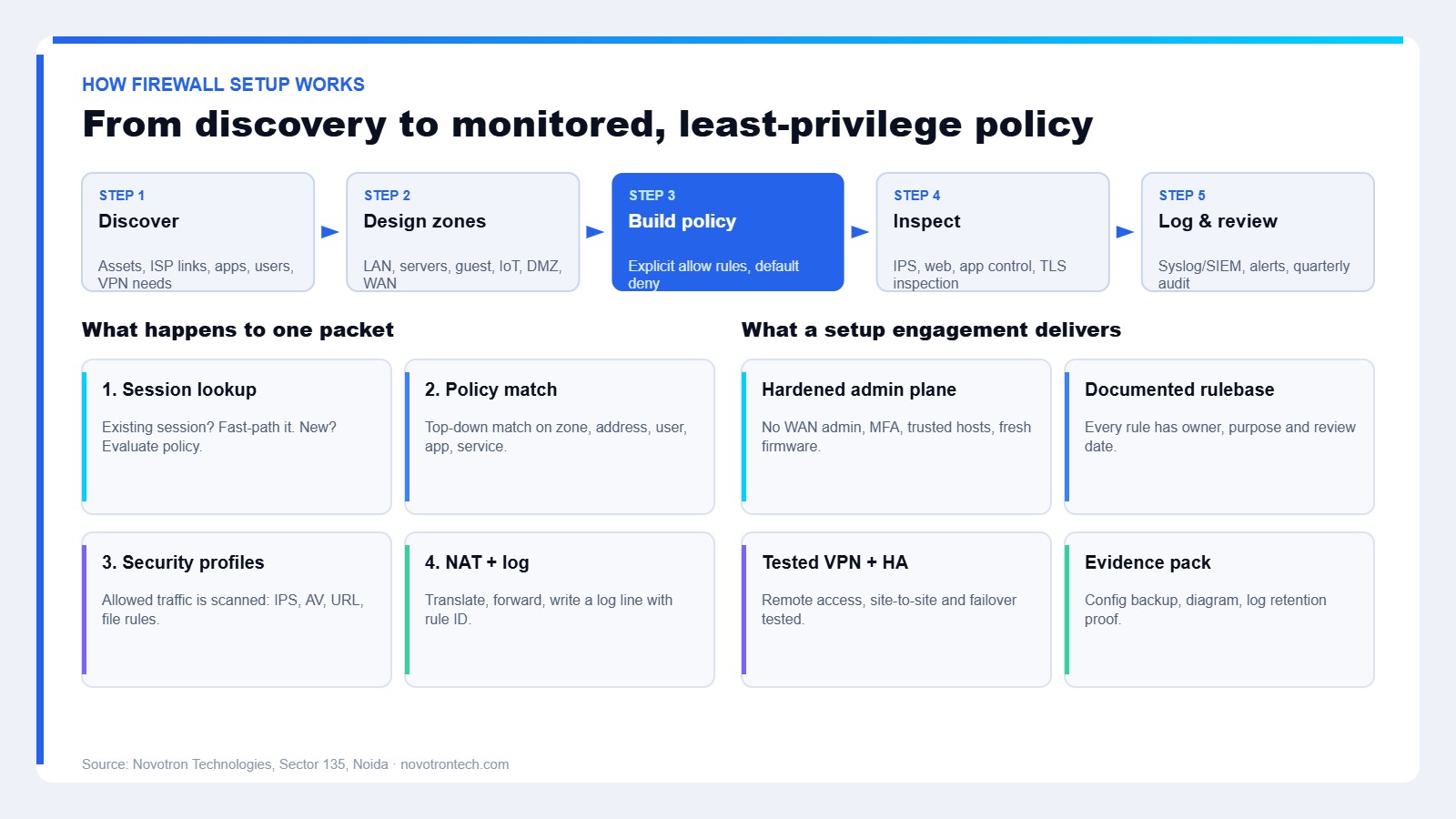
- Discovery: an inventory of internet links, sites, servers, SaaS apps, remote users and existing rules, so the new policy reflects real traffic.
- Architecture: zones for users, servers, guest Wi-Fi, CCTV and IoT, plus a DMZ for anything published to the internet.
- Policy build: explicit allow rules with a default deny at the bottom, written by zone, user group and application rather than by “any”.
- Security profiles: intrusion prevention, web filtering, application control, antivirus and, where it is justified, TLS inspection.
- Remote access and site-to-site VPN: with MFA on every remote login.
- High availability: an active-passive pair or at least a tested config backup and a spare plan.
- Logging and handover: logs shipped off the box, a diagram, a rule register and an admin runbook.
Notably, the last item is where most budget installs stop short. However, without logs and documentation, the firewall becomes a black box the moment the installer leaves.
How firewall setup services actually work
To understand why configuration quality matters, it helps to follow a single connection through the device. All three platforms differ in engine design, yet the logical flow is similar enough to explain once.
The input: packets arriving on an interface
Every connection arrives on an interface that belongs to a zone, for example LAN, WAN or Guest. So the first design decision, which zones exist, shapes every rule that follows. A flat network with one inside zone gives the firewall very little to enforce.
Processing: session lookup and policy match
Next, the firewall checks whether the packet belongs to a session it already knows. If it does, the traffic follows the existing decision. If it is new, the firewall walks the rulebase from the top and applies the first rule that matches source zone, destination, service, and often the user and the application too.
Palo Alto Networks built its platform around this idea, with App-ID, User-ID and Content-ID running in what the vendor calls a single-pass architecture. Similarly, FortiGate and Sophos Firewall both identify applications and users, although the way you express those rules differs by product.
The decision layer: inspection profiles
Once a rule allows the traffic, security profiles decide what happens inside it. For instance, an IPS signature can drop an exploit attempt, a web filter can block a newly registered domain, and file controls can stop an executable download. Because most traffic is now encrypted, these checks see far less unless TLS inspection is configured, and that brings certificate deployment and privacy exclusions with it.
Output, monitoring and security of the firewall itself
Finally, the firewall applies NAT, forwards the packet and writes a log entry that names the matching rule. Those logs should go to a syslog server or SIEM, and ideally to a SOC team that watches them. Just as important, the management plane needs protecting: no admin login from the internet, MFA for administrators, and firmware kept current. Edge devices from every major vendor have appeared in the CISA Known Exploited Vulnerabilities catalog, including CVE-2024-21762 in FortiOS SSL VPN, CVE-2024-3400 in PAN-OS GlobalProtect and CVE-2022-1040 in Sophos Firewall.
A practical example
Consider an illustrative 120-person company with a Noida head office, a Pune branch, 30 remote staff and an on-premises ERP server. Before the project, the head office runs one flat network and one broad outbound rule. After the setup, the design looks like this:
- Staff, servers, guest Wi-Fi and CCTV each sit in their own zone, so a compromised camera cannot reach the ERP server.
- The ERP server accepts connections only from the Finance and Operations user groups, plus the Pune branch over an IPsec tunnel.
- Remote staff connect over SSL or IPsec VPN with MFA, and they only reach the apps their group needs.
- Guest Wi-Fi goes straight to the internet with web filtering and no route to internal zones.
- Logs go to a central collector and are kept for 180 days, which lines up with the CERT-In logging direction.
As a result, the same hardware now blocks lateral movement that the old flat design silently allowed. Nothing about the box changed; the configuration did.
FortiGate vs Sophos vs Palo Alto for growing businesses
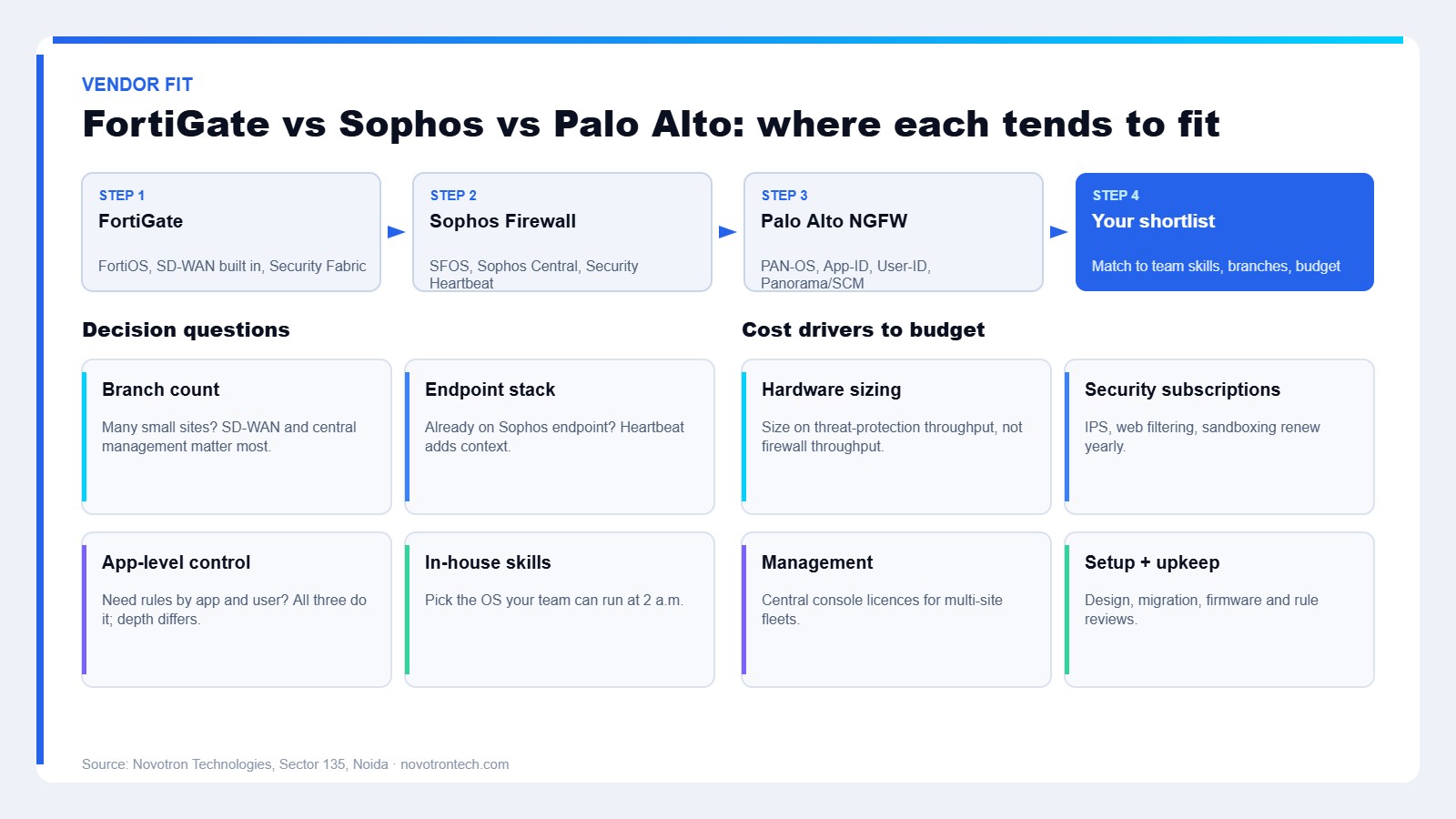
All three are mature next-generation firewalls, and each can protect a growing business well when it is set up properly. Therefore, the honest answer to “which is best” depends on your branches, your endpoint stack and the skills of whoever will run it day to day.
| Criteria | FortiGate (Fortinet) | Sophos Firewall | Palo Alto Networks NGFW |
|---|---|---|---|
| Operating system | FortiOS | SFOS | PAN-OS |
| Typical strength | Built-in SD-WAN and broad Security Fabric integrations | Security Heartbeat with Sophos endpoint, simple cloud management | App-ID and User-ID policy model with deep app visibility |
| Central management | FortiManager, FortiCloud | Sophos Central | Panorama, Strata Cloud Manager |
| Often a good fit for | Multi-branch SMEs with several internet links | Teams already on Sophos endpoint who want one console | Organisations prioritising app-level control and audit depth |
| Watch-outs | Many features, so rulebases sprawl without discipline | Deepest value appears with Sophos endpoints | Usually the higher budget line, plus a steeper learning curve |
For example, a company with eight small branches and dual ISP links at each often lands on FortiGate because SD-WAN is part of FortiOS. Meanwhile, a firm already running Sophos Intercept X can use Security Heartbeat so the firewall reacts when an endpoint reports a problem. On the other hand, a business facing strict audit requirements may accept Palo Alto’s higher cost for its application-centric policy model.
Also, size the hardware on the vendor’s threat-protection throughput, not the headline firewall throughput. The headline figure usually assumes inspection is off, which is rarely how you will run it.
Managed firewall setup services vs in-house vs install-only
Beyond the vendor choice, the bigger decision is who configures and maintains the device. Here is how the three common routes compare.
| Criteria | Install-only by reseller | In-house IT team | Managed setup (Novotron approach) |
|---|---|---|---|
| Design and zoning | Often minimal | Depends on in-house experience | Documented zone design before build |
| Rule quality | Default or broad rules common | Varies with workload | Least-privilege rules with owners |
| Firmware and patching | Usually not included | Competes with other tickets | Scheduled, tracked maintenance |
| Logging and monitoring | Rarely configured | Possible, often skipped | Logs shipped off-box, optional SOC |
| Cost pattern | Lowest upfront | Salary time, no invoice | Project fee plus optional retainer |
In short, install-only is cheapest on day one but tends to cost more later. By contrast, an in-house team knows the business best, so a hybrid model, where we design and they operate, works well for many clients.
Common firewall configuration mistakes we see
- Admin HTTPS or SSH reachable from the WAN, often with the default admin account still active.
- “Any-any” rules created to fix an urgent issue and never removed.
- Unused VPN accounts that belong to former staff or vendors.
- IPS and web filtering licensed but never attached to rules.
- No config backup, so a failed firmware upgrade becomes a full rebuild.
- Logs stored only on the device, which then overwrites them within days.
Each one is fixable in hours. However, together they explain why a firewall can be “installed” yet still fail an audit or a VAPT exercise.
Firewall setup services and Indian compliance
For Indian organisations, configuration also has a regulatory side. Under the CERT-In directions of 28 April 2022, service providers, intermediaries, data centres, body corporates and government organisations must enable ICT system logs, keep them securely for a rolling 180 days within Indian jurisdiction, and report specified incidents within six hours of noticing them. Firewall logs are usually the first place an incident timeline comes from, so retention has to be designed, not assumed. Our CERT-In compliance guide covers the wider obligations.
Likewise, published benchmarks help turn “secure configuration” into something checkable. The CIS Fortinet Benchmark and CIS Palo Alto Networks Benchmark give concrete settings to test against, and NIST SP 800-41 Rev. 1 remains a sound reference for firewall policy design.
Pros and cons of Novotron firewall setup services
Pros
- One team covers firewall design, managed IT, SOC monitoring and VAPT, so the firewall is tested and watched, not just installed.
- Work is documented: zone diagram, rule register and config backups are part of the handover.
- A local team in Sector 135, Noida, for businesses in Noida and Delhi NCR that want on-site support.
- We work across FortiGate, Sophos and Palo Alto, so the recommendation follows your needs rather than one product line.
Cons
- A proper discovery and design phase takes longer than a same-day install.
- Least-privilege rules can briefly break undocumented workflows, so a short tuning period is normal.
- Hardware and security subscriptions are billed by the vendor or distributor, so total cost includes renewals beyond our fee.
- Very large, multi-country estates may prefer a global provider with round-the-clock regional staff.
How we measure success
We do not publish invented percentages. Instead, every firewall project is judged against the same evaluation framework, and the numbers come from your own device:
| Measure | How it is checked |
|---|---|
| Rule hygiene | Count of any-any, unused and shadowed rules before and after |
| Exposure | External scan of management ports and published services |
| Patch currency | Firmware version against the vendor advisory list |
| Detection coverage | Share of allow rules with IPS and web profiles attached |
| Log retention | Days of searchable logs held off-box |
| Resilience | Failover or restore test result, with time taken |
Then we repeat the same checks at each quarterly review, so drift shows up early.
Frequently Asked Questions
What do firewall setup services include?
Firewall setup services usually include discovery, zone design, rule creation, security profiles such as IPS and web filtering, VPN and MFA, high availability, logging, and a documented handover with config backups.
Which is better for a small business: FortiGate, Sophos or Palo Alto?
None is best for everyone. FortiGate often suits multi-branch SD-WAN needs, Sophos suits teams already using Sophos endpoint, and Palo Alto suits firms that prioritise app-level control and can fund it.
How long does a firewall setup take?
A single-site setup with a clean design typically takes a few days including testing. Multi-site rollouts or migrations from another vendor take longer because rules must be mapped and verified.
Do I need TLS inspection on my firewall?
Often yes for web and malware protection, since most traffic is encrypted. However, it needs certificate deployment and exclusions for banking, health and other sensitive categories.
How often should firewall rules be reviewed?
Review the rulebase at least quarterly and after major changes. Remove unused rules, confirm owners, and check firmware against vendor advisories each time.
Does a firewall help with CERT-In compliance?
It helps, because firewall logs support incident reporting. You still need logs kept for 180 days within India and a process to report specified incidents within six hours.
Planning a firewall setup or replacement?
If your current firewall was installed once and never revisited, or you are choosing between FortiGate, Sophos and Palo Alto for a new office, a short review is the right first step. Our team will look at your rules, exposure and logging, then recommend a design that fits your size and budget. Talk to Novotron about firewall setup services or call +91-8130009878.
Related reading: firewall vs antivirus, why network security matters, zero trust security and our server hardening checklist.