
Most new offices in Noida get their IT the same way. Someone signs the lease, the interior contractor pulls “network points” wherever the furniture layout puts desks, an ISP drops a fibre line and a router, and two weeks before move-in somebody asks where the firewall is going. The office opens on time. Then the problems show up over the next six months: a dead Wi-Fi zone near the conference room, a meeting room camera on the same network as the finance laptops, no record of which cable goes where, and an inverter that keeps the lights on but not the switch.
This is the checklist we’d want a client to have before signing off on interiors. It focuses on the technical build of an office network setup in Noida (cabling, switching, Wi-Fi and security) from pre-possession survey to handover documents, including the Indian compliance points that now affect logging and monitoring. It’s written for founders, admin heads and IT managers moving into a new floor. If you are still at the planning stage and need the overall timeline, connectivity orders and budgets by headcount, start with our broader guide to IT setup for a new office in Noida, then come back here for the network detail.
How a new office network actually works
A problem in one layer usually gets blamed on another (“the Wi-Fi is slow” is often an ISP or DHCP problem), so it’s worth knowing what each piece does.
- ISP / WAN links. Ideally two connections from two providers, entering the building by different routes. One fibre line is a single point of failure, whatever the SLA says.
- Firewall or SD-WAN edge. A next-generation firewall (NGFW) terminates both links, handles failover, inspects traffic, runs remote access and enforces rules between internal segments. Multi-site businesses may use an SD-WAN edge for link steering, with security on the box or delivered from the cloud.
- Core and access switches. The core carries VLANs and routing between them; access switches connect desks, printers, cameras and APs. In a small office these may be one switch stack.
- VLANs. Separate logical networks for staff, guests, voice, CCTV/IoT, printers and management. This is the cheapest security control you will ever deploy.
- PoE. Power over Ethernet feeds access points, IP phones and cameras from the switch, so the switch’s power budget and UPS runtime matter.
- Wi-Fi access points and controller. Ceiling-mounted APs, managed from a cloud or on-premises controller, broadcasting a small number of SSIDs mapped to VLANs.
- Endpoints. Laptops, desktops and phones with EDR, disk encryption and patching.
- Identity and MFA. One directory (Microsoft Entra ID, Google Workspace or similar) controlling network and app access, with MFA enforced.
- Monitoring and logging. Firewall, switch, AP, server and cloud logs shipped to a central store, time-synchronised, and retained long enough to meet Indian requirements.
- Backup. Copies of the data that matter, including cloud SaaS data, with at least one copy offline or immutable.
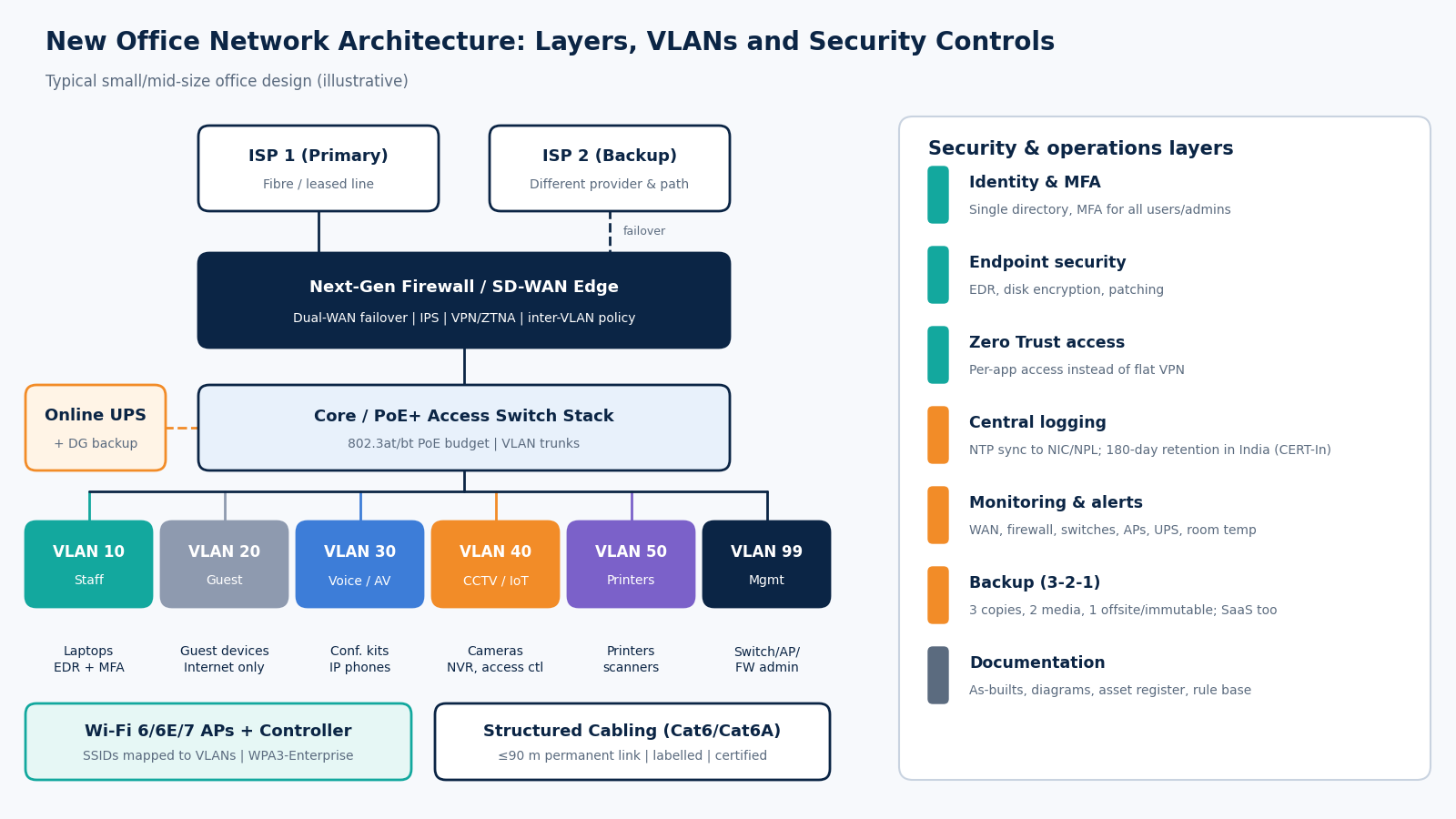
If one layer is missing, the rest can’t compensate. A great firewall doesn’t help a flat network, and excellent Wi-Fi doesn’t help when the only ISP line drops during a client demo.
A practical example: a 40-seat office in a Noida sector building
Here’s a hypothetical but typical scenario. A 40-person consulting firm takes about 4,000 sq ft of bare shell in a Noida commercial building: open workstations, two meeting rooms, a boardroom, pantry, reception and a small lockable room the landlord calls the “server room”. Staff mostly use laptops and cloud apps.
A sensible design for that office would look like this:
- Two internet links from different providers, terminated on an NGFW (or an HA pair).
- One rack with patch panels, a 48-port PoE+ switch (or two stacked 24-port units) and cable management.
- Roughly 60 to 70 Cat6 points for desks, meeting-room displays, ceiling APs and cameras, each under 90 m of permanent link, on patch panels and labelled.
- Five or six Wi-Fi 6/6E APs placed from a predictive survey. More APs at lower power beats fewer at full blast.
- VLANs for staff, guest, voice/conferencing, CCTV/access control, printers and network management.
- An online UPS for the rack sized for the PoE load, plus a confirmed connection to the building DG backup.
- EDR on every laptop, MFA on email and admin accounts, central logs held for at least 180 days, and a backup plan for Microsoft 365 or Google Workspace data.
Nothing exotic. The value is in doing all of it, in order, and documenting it.
The phased new office IT setup checklist
Use these phases in order. The biggest savings come from the first two, because walls, ceilings and furniture are still open.
Phase 1: Pre-possession and site survey
- Confirm which ISPs actually have fibre in the building riser. Ask the facility manager, not just the ISP sales rep. Get feasibility in writing from at least two providers.
- Check the entry path for each ISP: shared riser, separate duct, or rooftop. Two ISPs in the same riser still share a cut risk.
- Walk the floor with the interior layout and mark desks, meeting rooms, printers, cameras, access control and display points.
- Pick the IT/rack room location: away from pantry plumbing and washrooms, with a lockable door, and with space for a rack, cooling and UPS.
- Verify building power: whether DG backup covers your floor’s sockets or only common areas, the changeover time, and whether a dedicated circuit for the rack is possible.
- Note ceiling type, glass partitions and concrete columns; they drive AP placement and cable routing.
- Run or commission a predictive Wi-Fi survey from the floor plan before the ceiling closes.
Phase 2: Structured cabling
- Specify Cat6 as the minimum for data; consider Cat6A for AP and uplink runs if you expect multi-gigabit Wi-Fi 6E/7 APs or 10G uplinks.
- Design to the TIA-568 channel limit: 100 m total, which means a permanent link of up to 90 m plus patch cords. Long floors may need a second rack (IDF).
- Terminate every run on patch panels in the rack, never directly into switches.
- Use a labelling scheme (TIA-606 style) that identifies the rack, panel and port on both ends and matches the as-built drawing.
- Keep data cabling separated from power cabling in trays and conduits; don’t let the electrical contractor share the same path.
- Require certification testing (not just continuity testing) of every link with a certifier, with test reports handed over.
Phase 3: Core network and switching
- Size switches for today’s ports plus reasonable headroom.
- Calculate the PoE budget. 802.3af gives up to 15.4 W per port at the switch, 802.3at (PoE+) 30 W, and 802.3bt up to 60 W (Type 3) or 90 W (Type 4). Newer APs often need PoE+ or more to run all radios.
- Create VLANs: staff, guest, voice/AV, CCTV/IoT, printers, servers (if any) and management.
- Put switch and AP management interfaces on the management VLAN, reachable only from IT admin devices.
- Disable unused ports or put them in a quarantine VLAN.
- Back up switch configurations and store them outside the switch.
Phase 4: Wi-Fi
- Design for capacity, not just coverage: count devices per area.
- Keep SSIDs few: typically corporate, guest and possibly one for IoT. Each extra SSID adds airtime overhead.
- Use WPA3-Enterprise (or WPA2/WPA3 with 802.1X) for staff, tied to your identity provider. Avoid a shared staff password.
- Isolate the guest SSID: internet only, client isolation on, bandwidth limits, captive portal if you need terms or logging.
- Consider 6 GHz. India delicensed the lower 6 GHz band (5925 to 6425 MHz) for low-power indoor and very low-power Wi-Fi use in January 2026, so Wi-Fi 6E and Wi-Fi 7 (IEEE 802.11be) APs can now use it in India, subject to the notified rules and the vendor’s India regulatory approval for the specific model.
- Do a post-installation validation survey and fix gaps before handover.
Phase 5: Security
- Deploy an NGFW with a default-deny policy between VLANs, then allow only what’s needed. Our page on firewall setup services covers what a proper deployment includes.
- Configure dual-ISP failover and test it by physically unplugging the primary link.
- Replace any “any-any” VPN with MFA-protected remote access, and ideally move towards Zero Trust access for internal apps.
- Install EDR on every endpoint and server; enforce disk encryption and automatic patching.
- Enforce MFA on email, cloud consoles, VPN, firewall admin and anything with finance or customer data.
- Change every default password on firewalls, switches, APs, cameras, printers and NVRs.
- Harden baseline configurations on firewalls, switches, servers and endpoints before go-live, not after the first audit. If you want outside help, see our security hardening page.
- Point all devices to a common time source. CERT-In’s 2022 directions require organisations to connect to the NTP servers of NIC or NPL (or servers traceable to them).
- Send logs to a central store and retain them for a rolling 180 days within India, as CERT-In requires.
- Designate a CERT-In point of contact and write down the incident reporting path. Reportable incidents must be reported within 6 hours of noticing them.
Phase 6: Power, rack and environment
- Use an online (double-conversion) UPS for the rack, sized for switches, firewall, PoE load and a realistic runtime until DG power stabilises.
- Put the UPS on the building DG-backed circuit and confirm the changeover actually works.
- Ground the rack properly and use surge protection. Monsoon lightning and voltage fluctuations are a real cause of failed switch ports.
- Provide cooling that runs 24×7. Office split ACs switched off by housekeeping on Friday evening are a classic cause of Monday outages, especially in May and June heat.
- Add a temperature sensor or at least an alert from the UPS/switch when the room overheats.
Phase 7: Go-live
- Test each network point from the patch panel to the desk.
- Walk-test Wi-Fi with a real laptop and phone, including a video call across AP boundaries.
- Test ISP failover under load, not just ping.
- Check that guest users cannot reach staff, printer or camera VLANs.
- Confirm logs from the firewall and cloud tenant are arriving at the central store with correct timestamps.
- Run a test restore from backup.
Phase 8: Handover documentation
- As-built cabling drawing with labels matching the patch panels.
- Cable certification reports for every link.
- Network diagram showing ISPs, firewall, switches, VLANs and IP ranges.
- Asset register: model, serial number, firmware, warranty and support contract end dates.
- Admin credentials stored in a password manager (never in a spreadsheet), with named owners.
- Firewall rule base with a one-line reason for each rule.
- ISP account details, circuit IDs and escalation contacts.
- Backup schedule, retention and restore procedure.
- Incident response contacts, including the CERT-In point of contact.
How we measure success
“It works” isn’t an acceptance criterion. These checks decide whether a new office network is actually finished. Wi-Fi figures are common industry design guidelines, not regulation; adjust for voice-heavy or high-density spaces.
| Area | What to measure | Typical target / pass condition |
|---|---|---|
| Wi-Fi coverage | Signal strength (RSSI) from the validation survey | About -67 dBm or better in work areas for voice/video, with a healthy signal-to-noise ratio (often 25 dB or more) |
| Wi-Fi capacity | Throughput and latency during a busy-hour test | Video calls stable while the area is at planned occupancy |
| Cabling | Certification test results | 100 percent of links pass for the specified category; failures re-terminated and retested |
| Internet resilience | Failover test with primary link unplugged | Traffic moves to secondary link automatically; recovery time recorded |
| Uptime | Monitoring of WAN, firewall, switches and APs | Tracked monthly against an agreed target; every outage has a root cause |
| Endpoint security | EDR and patch coverage | Every managed endpoint reporting; critical patches applied within agreed timeframe |
| Identity | MFA enrollment | All users and all admin accounts enrolled; no legacy authentication |
| Logging | Log sources, time sync and retention | Key systems logging centrally, NTP-synced, retained 180 days in India |
| Backup | Test restore | Successful restore of sample files and a mailbox within the agreed recovery time |
| Documentation | Handover pack | All items in Phase 8 delivered and reviewed |
Who should do the setup? Comparing your options
There are three common routes. The right one depends on your team and timeline.
| Factor | One IT infrastructure & security partner (e.g., Novotron) | DIY by in-house staff | Multiple separate vendors |
|---|---|---|---|
| Design ownership | One party designs cabling, network, Wi-Fi and security together | Depends on the experience of your staff | Each vendor designs its own piece; gaps between them are common |
| Security built in | Security considered from the design stage | Often added after go-live | Usually the firewall vendor’s scope only |
| Accountability when something fails | Single point of contact | Internal team | Finger-pointing between ISP, cabler and network vendor is common |
| Documentation | Can be defined as a deliverable in the scope | Frequently incomplete | Scattered across vendors |
| Upfront cost | Service fees on top of hardware | Lowest cash outlay, highest time cost | Varies; coordination cost is hidden |
| Speed | Parallel workstreams under one plan | Limited by staff availability | Limited by the slowest vendor |
| Best fit | Teams without dedicated network/security staff, or with tight move-in dates | Offices with an experienced in-house network engineer | Large organisations with an internal PMO to coordinate |
Whichever route you pick, write down the scope explicitly: who owns the as-built drawings, who tests failover, and who is on call for the first month after move-in.
Pros and cons of doing it properly up front
Pros
- Cabling mistakes are cheap to fix before ceilings close and expensive afterwards.
- VLAN segmentation and MFA from day one avoid a painful re-architecture later.
- Logging and time sync are in place before you ever need to report an incident.
- Documentation reduces dependence on one person.
Cons
- Higher upfront cost: certified cabling, a second ISP, an online UPS and a proper NGFW all add to the budget.
- More planning time before possession, which can clash with interior timelines.
- Enterprise-grade gear needs ongoing licences and firmware updates; someone has to own that.
- A 10-person office may not need everything here. Scale the checklist to the risk, but don’t skip segmentation, MFA, backups or logs.
Common mistakes we see in new office setups
- Letting the interior contractor design the network. Points end up where the furniture is, not where APs and cameras need to be.
- One flat network. Guests, CCTV and finance laptops on the same subnet.
- An ISP-supplied router as the firewall. Rarely any segmentation, logging or proper VPN.
- Two ISPs, one path. Both lines share the same riser or even the same last-mile provider.
- No labels, no as-builts. Every future move becomes a toning exercise.
- No log retention plan until the first time someone asks “what happened on that laptop last month?”
- Assuming SaaS data is backed up. Microsoft 365 and Google Workspace retention is not the same as an independent backup; see why Microsoft 365 backup needs its own plan.
Compliance points Indian offices shouldn’t ignore
Two sets of rules shape how an Indian office should build its logging and security, even for smaller companies.
The CERT-In directions of 28 April 2022 apply to body corporates as well as service providers. They require time synchronisation with NIC or NPL NTP servers, reporting of specified cyber incidents within 6 hours of noticing them, a designated point of contact, and logs of ICT systems retained securely for a rolling 180 days within Indian jurisdiction. Our CERT-In compliance guide goes through each obligation.
The Digital Personal Data Protection Act, 2023 requires data fiduciaries to take reasonable security safeguards to prevent personal data breaches. The DPDP Rules, 2025, notified in November 2025, spell out measures such as encryption or masking, access control, logging and monitoring of access to personal data, backups for continued processing, and retention of those logs for a year, with most obligations phased in over 18 months. Segmentation, MFA, central logging and tested backups are the technical groundwork; take legal advice on how the Act applies to you.
If you don’t have someone senior to own these decisions internally, a fractional technology leader can help. Our CIO advisory services page explains how that model works and what it covers.
Noida-specific practicalities
- Check ISP presence building by building. Availability of fibre providers can differ even between neighbouring towers in the same sector. Ask the facility team which providers already serve other tenants.
- Understand the building’s DG coverage. Many commercial buildings provide DG backup, but coverage, changeover time and load limits vary. Your rack UPS has to bridge that gap.
- Plan for summer heat. A closed IT room with no 24×7 cooling will overheat in peak summer. Plan dedicated cooling and alerts.
- Plan for the monsoon. Keep the rack off the floor, away from windows and plumbing, and use proper surge protection and earthing.
- Involve building management early. Riser access, core drilling and after-hours work often need permissions.
Frequently asked questions
How long does a new office IT setup take?
Start design and ISP orders several weeks before move-in; ISP provisioning and hardware lead times are usually the longest items. Cabling must happen while ceilings are still open.
Is Cat6 enough, or should we use Cat6A?
Cat6 is adequate for gigabit desk connections. For AP runs and uplinks, Cat6A is worth considering if you plan to use multi-gigabit Wi-Fi 6E or Wi-Fi 7 access points or 10G links, because it supports 10GBASE-T over the full 100 m channel.
Can we use 6 GHz Wi-Fi (Wi-Fi 6E / Wi-Fi 7) in India now?
Yes, within limits. In January 2026 the Department of Telecommunications delicensed the lower 6 GHz band (5925 to 6425 MHz) for low-power indoor and very low-power devices. Check that the specific AP model is approved for India and supports the 6 GHz operation you want.
Do we really need two internet connections?
If you rely on cloud apps and video calls, yes. A second provider on a different physical path, with automatic firewall failover, is one of the cheapest reliability upgrades.
What is VLAN segmentation and why does it matter?
VLANs split one physical network into separate logical ones (staff, guest, CCTV, printers). The firewall controls what talks to what, so a compromised camera can’t reach finance laptops.
Do CERT-In’s rules apply to a small private company?
The 2022 directions are addressed to body corporates among others, so most registered companies fall within scope. Build 180-day logging, NIC/NPL time sync and a 6-hour reporting path into your setup, and confirm specifics with your legal adviser.
Is an inverter enough to power the network rack?
Generally no. An online UPS gives clean, uninterrupted power and bridges the gap until DG backup takes over. Size it for the PoE load, not just the switch’s base consumption.
What documents should we get at handover?
Everything in Phase 8 above: as-built drawings, certification reports, network diagram, asset register, firewall rule base, ISP details, backup procedures and credentials in a password manager.
Planning a new office in Noida?
The best time to get the network right is before the interior contractor closes the ceiling. If you’re moving into a new floor and want one team to plan the cabling, network, Wi-Fi and security together, talk to the Novotron team with your floor plan and move-in date. You can also read more about Novotron and our work in IT infrastructure and cyber security.