
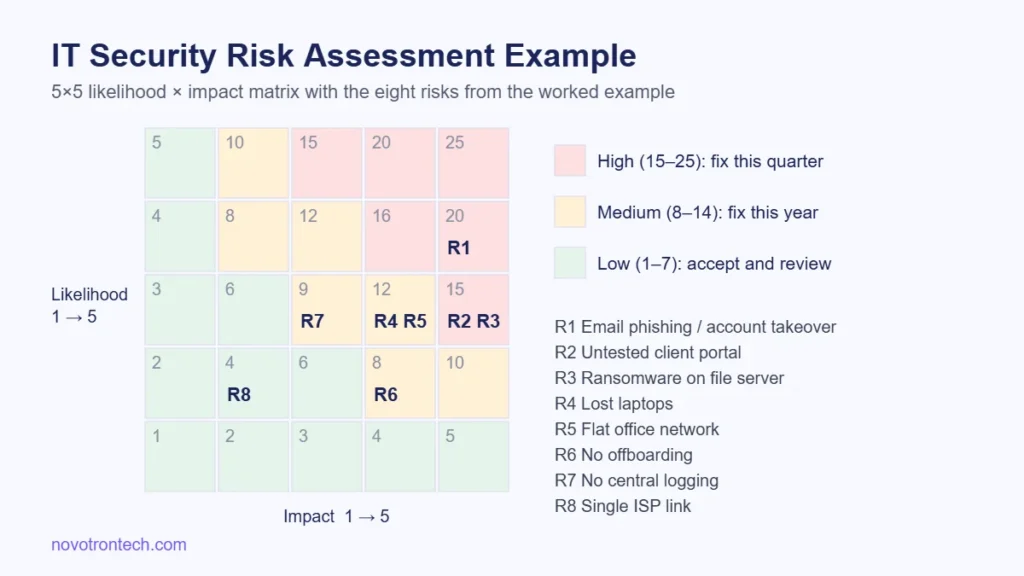
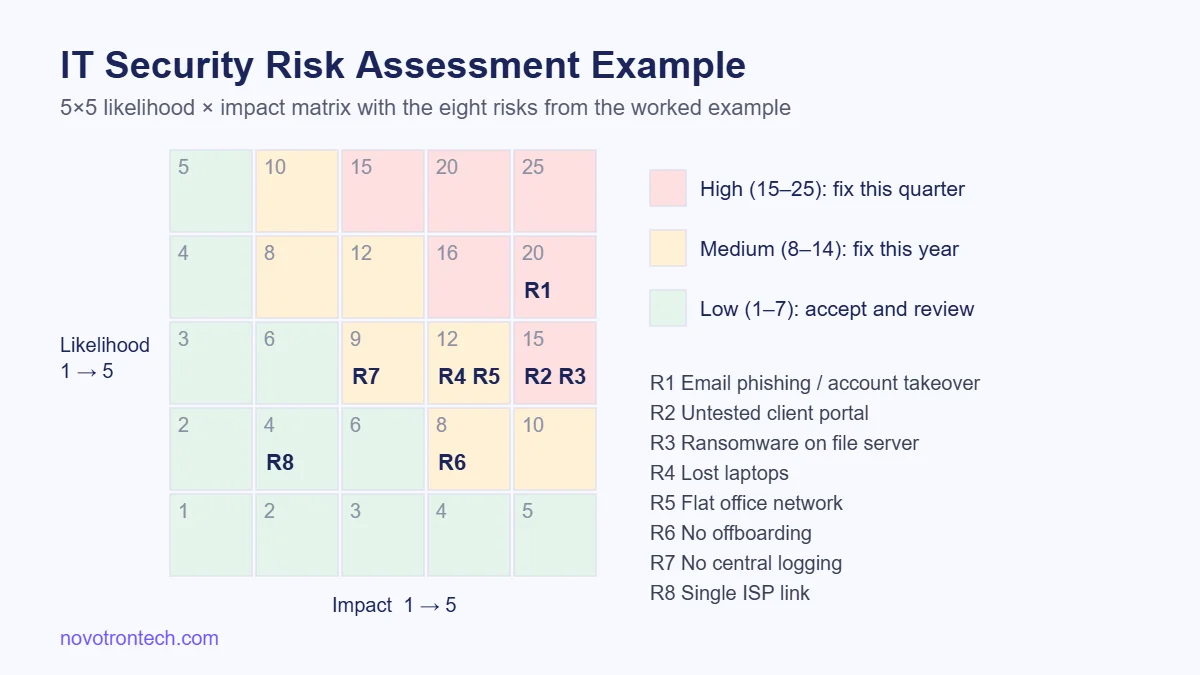
Short answer: an IT security risk assessment lists the assets a business depends on, the realistic threats to each, how likely each threat is and how much damage it would do, then ranks the results so money goes to the biggest risks first. The worked example below does exactly that for a fictional 60-person firm in Noida, using a simple 5×5 likelihood-and-impact scale you can copy.
If you want the theory first (what a risk assessment is, and how NIST CSF, ISO 27001 and CIS Controls fit), read our complete guide to cyber security risk assessment. This article is the practical companion: one company, one assessment, every number shown.
The example company
The business in this example is illustrative, not a client. It is a 60-person chartered accountancy and payroll firm with an office in Noida and a small team in Gurugram. It runs Microsoft 365 for email, a Windows file server in the office, a cloud accounting application, 55 laptops, and a client portal where customers upload salary and tax documents. It holds personal data of employees of its clients, so India’s Digital Personal Data Protection Act, 2023 applies to it.
The owner’s question was simple: “We have a limited security budget this year. Where should it go?” A risk assessment is how you answer that honestly instead of buying whatever the last vendor pitched.
Step 1: List the assets that matter
Start with what the business cannot run without, not with every device. For this firm the list came down to six assets:
- Client portal — holds salary slips, PAN details and bank information uploaded by clients.
- Microsoft 365 mailboxes — every client conversation and payment instruction passes through email.
- Office file server — ten years of working papers.
- Cloud accounting application — live books of 200 clients.
- Staff laptops — 55 devices, a third of which travel between Noida, Gurugram and client sites.
- Office network and firewall — connects the file server and on-site staff to everything else.
Step 2: Set a scoring scale before you score anything
Agree the scale first, or every score becomes an argument. This example uses the common 5×5 approach described in NIST SP 800-30: rate likelihood and impact from 1 to 5, then multiply them for a risk score between 1 and 25.
| Score | Likelihood (next 12 months) | Impact on the business |
|---|---|---|
| 1 | Rare — no realistic path today | Negligible — fixed in hours, no client effect |
| 2 | Unlikely | Minor — a day of disruption, internal only |
| 3 | Possible — has happened to similar firms | Moderate — several days down or a few clients affected |
| 4 | Likely — known weakness, common attack | Major — client data exposed or a week of lost billing |
| 5 | Almost certain | Severe — regulatory action, loss of key clients |
Scores of 15 and above were treated as high and needed a fix this quarter; 8 to 14 as medium, fixed within the year; 7 and below as low, accepted and reviewed annually.
Step 3: Match threats and weaknesses to each asset
For each asset, write down the threat, the specific weakness that makes it possible, and what is already in place. The weakness is the part people skip, and it is the part you actually fix. The findings for this firm came from a short interview with the office manager, a review of Microsoft 365 settings, an external scan of the client portal and a look at the file server configuration.
Step 4: The completed risk register
| # | Asset | Threat | Weakness found | L | I | Score | Rating |
|---|---|---|---|---|---|---|---|
| R1 | M365 mailboxes | Phishing leading to account takeover and fake payment instructions | MFA enabled for partners only; no phishing training in two years | 4 | 5 | 20 | High |
| R2 | Client portal | Web attack exposing uploaded documents | Never security tested; outdated plugin found in external scan | 3 | 5 | 15 | High |
| R3 | File server | Ransomware encrypting working papers | Backups on a USB drive connected to the same server | 3 | 5 | 15 | High |
| R4 | Staff laptops | Lost or stolen device with client files | Disk encryption on about half of laptops | 3 | 4 | 12 | Medium |
| R5 | Office network | Attacker moving from a compromised laptop to the server | Flat network; default firewall rules; server admin ports open internally | 3 | 4 | 12 | Medium |
| R6 | Cloud accounting app | Former employee retains access | No offboarding checklist | 2 | 4 | 8 | Medium |
| R7 | All systems | Incident noticed too late to report on time | No central log collection or alerting | 3 | 3 | 9 | Medium |
| R8 | Office network | Internet outage stopping work | Single ISP link | 2 | 2 | 4 | Low |
L = likelihood, I = impact, Score = L × I. Notice that the most expensive-sounding risk (the internet link) scored lowest, while the cheapest fix (turning on MFA for everyone) addresses the highest score. That is the point of doing the assessment.
Step 5: Decide the treatment for each risk
Every risk gets one of four treatments: reduce it, transfer it (for example through insurance or a contract), avoid it (stop the activity), or accept it. For this firm the plan looked like this:
| Risk | Treatment | Action | Target score |
|---|---|---|---|
| R1 | Reduce | MFA for every account, block legacy sign-in, quarterly phishing simulation exercises, call-back rule for any change in bank details | 2 × 5 = 10 |
| R2 | Reduce | Patch the plugin, then a VAPT of the client portal with retesting after fixes | 2 × 5 = 10 |
| R3 | Reduce | Offline or immutable backup copy, tested restore every quarter | 2 × 4 = 8 |
| R4 | Reduce | BitLocker on all laptops, remote wipe through device management | 2 × 2 = 4 |
| R5 | Reduce | Separate server and staff networks, tighten firewall rules, apply a server hardening baseline | 2 × 4 = 8 |
| R6 | Reduce | Joiner-mover-leaver checklist tied to HR exits | 1 × 4 = 4 |
| R7 | Reduce | Central logging with alerting, or a managed SOC service if nobody can watch alerts | 2 × 3 = 6 |
| R8 | Accept | Review next year; staff can work from mobile hotspots | 4 |
The “target score” column is the residual risk: what is left once the action is done. Writing it down stops the list from turning into an endless shopping list, because you can see when a risk is good enough.
Why the Indian rules changed the ranking
Two regulations pushed impact scores up for this firm. Under the Digital Personal Data Protection Act, 2023, a failure to take reasonable security safeguards that leads to a personal data breach can attract a penalty of up to ₹250 crore, so any risk exposing client employee data was scored at impact 5. CERT-In’s April 2022 directions require reportable cyber incidents to be reported within six hours of noticing them and logs to be kept for 180 days, which is why the missing log collection (R7) made the register at all. Our guides to DPDP Act compliance and CERT-In compliance cover both in detail.
Mistakes that make a risk assessment useless
- Scoring threats without naming the weakness. “Ransomware: high” tells nobody what to fix. “Backups connected to the server” does.
- Treating a vulnerability scan as the assessment. A scan finds technical flaws; the assessment decides which of them matter to the business.
- No owner or date on actions. Every treatment needs one named person and a deadline.
- Doing it once. Repeat it at least yearly, and whenever you add a major system, office or supplier.
Frequently asked questions
What is an example of an IT security risk?
A typical example is “an attacker takes over a staff email account through phishing because multi-factor authentication is not enabled, then sends fake payment instructions to clients.” It names the asset (email), the threat (phishing), the weakness (no MFA) and the business impact (financial loss and client trust).
What should an IT risk assessment report include?
At minimum: the scope and date, the scoring scale, a risk register listing asset, threat, weakness, likelihood, impact and score, the agreed treatment for each risk with an owner and deadline, and the residual risk after treatment.
How is a risk score calculated?
The most common method multiplies likelihood by impact, each rated 1 to 5, giving a score from 1 to 25. Some organisations use qualitative labels (low, medium, high) or quantitative models such as FAIR, but the 5×5 matrix is the easiest starting point for small and mid-sized businesses.
How long does an IT security risk assessment take?
It depends on the number of systems and locations. For a single-office business like the one in this example, the interviews, configuration reviews and register are usually a matter of days, not months. Technical testing such as VAPT is scheduled separately.
Is a risk assessment the same as VAPT?
No. A risk assessment looks across the whole business and decides priorities. VAPT is one technical test that finds and exploits vulnerabilities in specific systems. The assessment often recommends where VAPT should be done, as it did here for the client portal.
Getting help with your own assessment
Novotron is an IT services and cybersecurity company based in Sector 135, Noida, supporting businesses on-site across Noida, Greater Noida, Delhi, Ghaziabad, Gurugram and Faridabad. If you would like a risk register like this built for your own systems, followed by the fixes it recommends, our compliance and audit team can help. Talk to us and we will reply within one business day.