Modern businesses depend on technology to communicate, serve customers, manage data, support employees, and deliver products and services. Servers, networks, cloud platforms, business applications, databases, endpoints, and security systems must work together continuously.
When even one critical component fails, the impact can spread across the organization.
A slow application can reduce employee productivity. A network outage can interrupt customer services. A server failure can make important business systems unavailable. A storage issue can create data-access problems. If these incidents remain undetected for too long, they can lead to downtime, financial losses, operational disruption, and reputational damage.
Many organizations still rely on a reactive IT model. They wait for employees or customers to report a problem and then begin troubleshooting. This approach can increase response times because the issue may already have affected users before the IT team becomes aware of it.
A proactive approach is more effective.
IT infrastructure monitoring gives businesses continuous visibility into the health and performance of their technology environment. Monitoring tools collect information from infrastructure components, identify unusual behavior, generate alerts, and help IT teams respond before minor issues become major disruptions.
From on-premises servers and network devices to cloud workloads and business applications, infrastructure monitoring helps organizations maintain reliable, efficient, and scalable IT operations.
This guide explains what IT infrastructure monitoring is, how it works, what systems it covers, and why it has become essential for modern businesses.
What Is IT Infrastructure Monitoring?
IT infrastructure monitoring is the continuous process of tracking the availability, health, performance, capacity, and operational status of an organization’s IT systems.
It uses monitoring tools, automated alerts, dashboards, performance data, and IT expertise to identify potential problems before they affect business operations.
Infrastructure monitoring may include:
- Physical servers
- Virtual servers
- Network devices
- Routers and switches
- Firewalls
- Cloud infrastructure
- Storage systems
- Databases
- Business applications
- Internet connections
- Wireless networks
- Virtual machines
- Containers
- Backup systems
- Remote office infrastructure
The goal is not only to identify failures after they occur. Effective monitoring helps organizations detect warning signs early and take corrective action before a service becomes unavailable.
For example, a monitoring platform may detect that a server’s storage capacity is approaching its limit. The IT team can investigate and increase capacity before the server experiences performance issues or stops functioning properly.
This proactive approach helps businesses reduce downtime and improve the reliability of critical IT services.
How Does IT Infrastructure Monitoring Work?
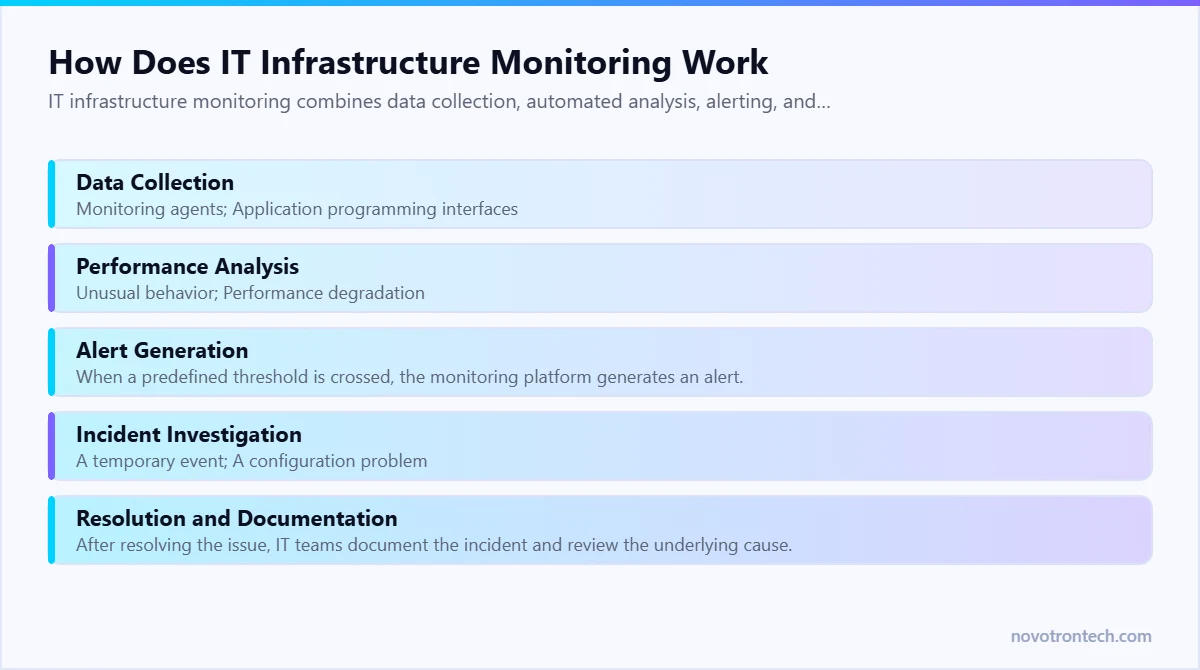
IT infrastructure monitoring combines data collection, automated analysis, alerting, and technical response.
Although monitoring environments vary, the process generally follows several stages.
1. Data Collection
Monitoring tools collect operational data from IT systems using methods such as:
- Monitoring agents
- Application programming interfaces
- Network protocols
- System logs
- Cloud platform integrations
- Device telemetry
- Performance counters
The collected information may include CPU usage, memory consumption, network latency, storage availability, application response time, and device status.
2. Performance Analysis
The monitoring platform analyzes the collected data to identify:
- Unusual behavior
- Performance degradation
- Resource shortages
- Service interruptions
- Capacity risks
- Configuration issues
Historical data can also help IT teams identify long-term trends.
3. Alert Generation
When a predefined threshold is crossed, the monitoring platform generates an alert.
For example:
- Server CPU usage remains unusually high.
- Available storage falls below a defined limit.
- A network device becomes unreachable.
- Application response time increases.
- A backup job fails.
- Internet connectivity is interrupted.
Alerts help IT teams investigate issues quickly.
4. Incident Investigation
IT engineers review the alert and determine whether it represents:
- A temporary event
- A configuration problem
- A performance issue
- A hardware failure
- A network outage
- An application problem
The team then identifies the likely cause and determines the appropriate response.
5. Resolution and Documentation
After resolving the issue, IT teams document the incident and review the underlying cause.
This process can help prevent similar issues from occurring again.
Why Is IT Infrastructure Monitoring Important?
Businesses now operate across complex technology environments that may include on-premises infrastructure, public cloud platforms, private cloud systems, remote employees, branch offices, and third-party applications.
Without centralized monitoring, IT teams may have limited visibility into how these systems are performing.
Infrastructure monitoring helps answer important questions, such as:
- Are critical systems available?
- Is network performance affecting employees?
- Are servers running out of resources?
- Are cloud workloads performing efficiently?
- Is an application responding slowly?
- Has a backup process failed?
- Are infrastructure issues increasing?
- Is the organization prepared for future capacity needs?
Continuous monitoring turns infrastructure data into actionable operational information.
Instead of relying only on user complaints, IT teams can identify issues through real-time system insights.
Key Components of IT Infrastructure Monitoring
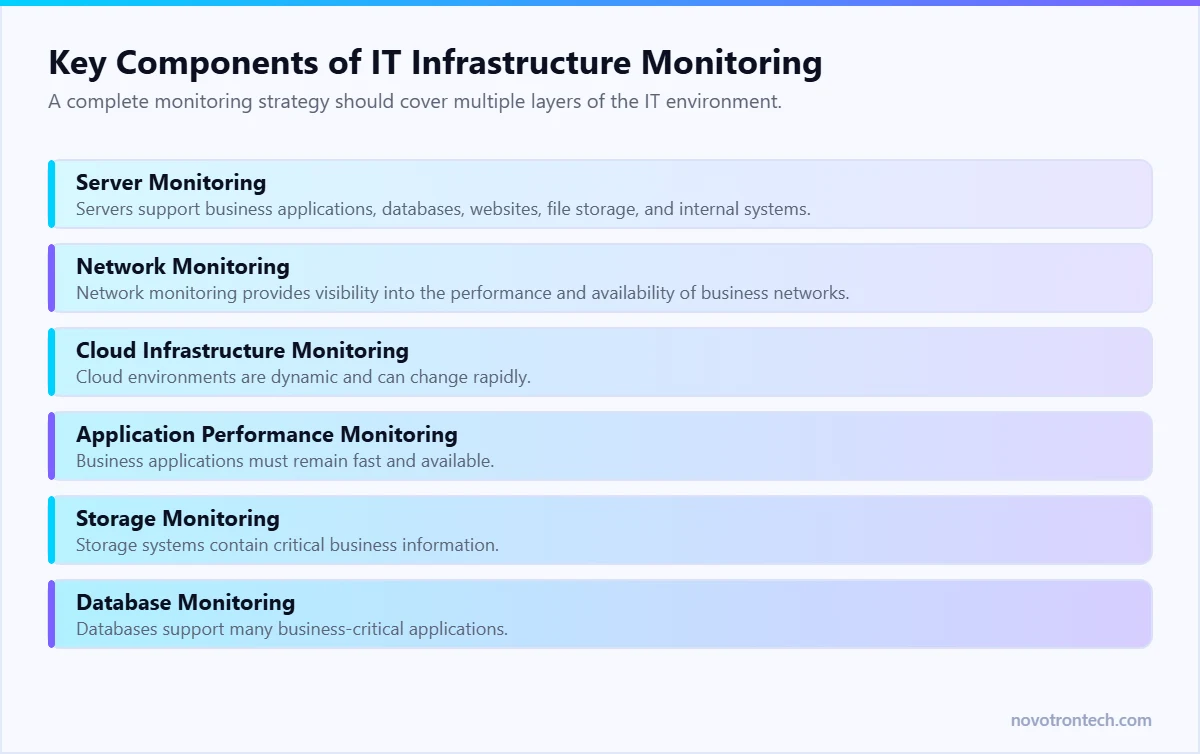
A complete monitoring strategy should cover multiple layers of the IT environment.
Server Monitoring
Servers support business applications, databases, websites, file storage, and internal systems.
Server monitoring tracks metrics such as:
- CPU utilization
- Memory usage
- Disk capacity
- Disk performance
- Operating system health
- Service availability
- Hardware status
- System uptime
Monitoring helps IT teams identify performance issues before they affect users.
Network Monitoring
Network monitoring provides visibility into the performance and availability of business networks.
It can track:
- Network latency
- Packet loss
- Bandwidth usage
- Device availability
- Network traffic
- Router performance
- Switch performance
- Internet connectivity
Network monitoring helps organizations identify bottlenecks and maintain reliable connectivity.
Cloud Infrastructure Monitoring
Cloud environments are dynamic and can change rapidly.
monitoring helps organizations track:
- Virtual machines
- Cloud storage
- Cloud applications
- Resource utilization
- Service availability
- Cloud performance
- Infrastructure costs
It also helps businesses maintain visibility across hybrid and multi-cloud environments.
Application Performance Monitoring
Business applications must remain fast and available.
Application monitoring may track:
- Response times
- Transaction performance
- Application availability
- Error rates
- Database connections
- User experience
This helps IT teams identify whether performance problems originate from the application, infrastructure, database, or network.
Storage Monitoring
Storage systems contain critical business information.
Monitoring helps track:
- Available capacity
- Storage performance
- Disk health
- Input/output activity
- Storage utilization
- Potential hardware issues
Early detection can reduce the risk of storage-related outages.
Database Monitoring
Databases support many business-critical applications.
Database monitoring can identify:
- Slow queries
- High resource usage
- Connection problems
- Performance bottlenecks
- Capacity concerns
This helps organizations maintain application reliability.
Types of IT Infrastructure Monitoring
Different monitoring methods provide different levels of visibility.
Availability Monitoring
Availability monitoring checks whether a system, device, application, or service is operational.
For example, it can determine whether:
- A website is accessible
- A server is online
- A network device is reachable
- A business application is available
Performance Monitoring
Performance monitoring measures how efficiently systems operate.
Common metrics include:
- Response time
- CPU utilization
- Memory usage
- Network latency
- Application speed
This helps identify performance degradation before users experience major problems.
Capacity Monitoring
Capacity monitoring helps organizations understand whether their infrastructure can support future growth.
It tracks trends involving:
- Storage usage
- Server resources
- Network bandwidth
- Cloud resource consumption
Capacity insights support better IT planning.
Configuration Monitoring
Configuration monitoring helps identify unauthorized or unexpected changes to infrastructure settings.
It can support operational consistency and reduce configuration-related risks.
Cloud Monitoring
Cloud monitoring provides visibility into cloud resources, workloads, applications, and services.
It is especially important for organizations using hybrid or multi-cloud environments.
Benefits of IT Infrastructure Monitoring
Reduced Business Downtime
Continuous monitoring helps IT teams detect warning signs before they develop into major outages.
Early detection can reduce the duration and impact of incidents.
Faster Issue Detection
Automated alerts notify IT teams when systems behave unexpectedly.
This reduces the time required to identify problems and begin troubleshooting.
Improved IT Performance
Monitoring provides insights into infrastructure bottlenecks and inefficient resource usage.
IT teams can use this information to optimize systems and improve performance.
Better Employee Productivity
Reliable IT systems help employees work without frequent interruptions.
When applications, networks, and business tools perform consistently, teams can remain productive.
Improved Customer Experience
Customers expect websites, applications, and digital services to remain available.
Infrastructure monitoring helps organizations maintain reliable service delivery.
Better Capacity Planning
Historical monitoring data helps businesses identify growth trends and plan infrastructure upgrades before capacity becomes a problem.
Lower Operational Risk
Proactive monitoring reduces the risk of unexpected failures affecting critical business operations.
More Informed IT Decisions
Monitoring dashboards and reports provide measurable insights that support technology planning and investment decisions.
Common IT Infrastructure Problems Monitoring Can Detect
Infrastructure monitoring can help identify many common issues, including:
- Server overload
- High CPU utilization
- Memory shortages
- Low storage capacity
- Network congestion
- High latency
- Packet loss
- Application slowdowns
- Database performance problems
- Device failures
- Internet connectivity issues
- Failed backup jobs
- Cloud resource problems
- Unavailable services
The earlier these issues are detected, the easier they may be to resolve.
IT Infrastructure Monitoring vs IT Infrastructure Management
These terms are related but not identical.
IT infrastructure monitoring focuses on observing system health, performance, availability, and capacity.
infrastructure management is broader. It includes planning, configuring, maintaining, securing, optimizing, and supporting the complete IT environment.
Monitoring provides the visibility needed for effective infrastructure management.
For example:
- Monitoring identifies high storage utilization.
- Infrastructure management determines how to expand capacity.
- Monitoring detects recurring network latency.
- Infrastructure management updates the network design.
- Monitoring identifies a failing server component.
- Infrastructure management coordinates repair or replacement.
Businesses need both capabilities to maintain reliable IT operations.
IT Infrastructure Monitoring and NOC Services
A Network Operations Center (NOC) uses infrastructure monitoring tools and operational processes to maintain IT availability and performance.
A NOC team may:
- Monitor infrastructure 24/7
- Review alerts
- Investigate incidents
- Troubleshoot technical issues
- Escalate critical problems
- Monitor backups
- Review system performance
- Generate operational reports
Infrastructure monitoring provides the data.
A NOC provides the people, processes, and operational response needed to act on that data.
This combination helps businesses move from reactive IT support to proactive infrastructure management.
Best Practices for IT Infrastructure Monitoring
Businesses should follow these practices to build an effective monitoring strategy:
Monitor Business-Critical Systems First
Prioritize systems that directly affect:
- Revenue
- Customer services
- Employee productivity
- Business operations
- Data availability
Define Meaningful Alert Thresholds
Alerts should identify important issues without creating unnecessary noise.
Poorly configured alerts can overwhelm IT teams and cause critical events to be missed.
Use Centralized Monitoring
A centralized dashboard provides better visibility across servers, networks, cloud systems, and applications.
Review Monitoring Data Regularly
Monitoring should support continuous improvement, not only incident response.
Regular reviews can identify trends and capacity risks.
Test Incident Response Procedures
Teams should know how to respond when critical alerts occur.
Documented procedures improve response consistency.
Integrate Monitoring with IT Service Management
Connecting monitoring platforms with ticketing systems can improve incident tracking and accountability.
Combine Monitoring with Cyber Security
Infrastructure monitoring should work alongside:
- SOC services
- SIEM platforms
- Endpoint security
- Vulnerability management
- Identity and access management
This creates stronger visibility across IT operations and cyber security.
Why Businesses Choose Novotron for IT Infrastructure Monitoring
Modern IT environments require continuous visibility, proactive support, and experienced technical management.
Novotron helps businesses monitor and manage critical IT infrastructure through scalable solutions designed to improve performance, reduce downtime, and support operational continuity.
Novotron’s capabilities include:
- 24/7 IT Infrastructure Monitoring
- Server Monitoring
- Network Monitoring
- Cloud Infrastructure Monitoring
- Application Performance Monitoring
- Infrastructure Health Monitoring
- Remote Infrastructure Management
- Managed NOC Services
- Incident Detection and Response
- Performance Reporting
- Capacity Planning
- Backup Monitoring
- Managed IT Services
- IT Infrastructure Management
By combining proactive monitoring, experienced IT professionals, and structured operational processes, Novotron helps organizations identify infrastructure risks early and maintain reliable technology environments.
Conclusion
IT infrastructure has become the foundation of modern business operations. When networks, servers, cloud platforms, applications, and storage systems perform reliably, employees can remain productive and customers can access services without disruption.
However, reactive IT support is no longer enough.
IT infrastructure monitoring gives organizations continuous visibility into the health, availability, performance, and capacity of critical systems. It helps IT teams identify problems early, respond faster, reduce downtime, and make informed infrastructure decisions.
An effective monitoring strategy should cover the complete IT environment, including servers, networks, cloud resources, applications, storage systems, and business-critical services.
By combining proactive monitoring with managed IT services and NOC support, businesses can improve operational resilience and maintain reliable technology as they grow.
Novotron helps organizations build proactive IT operations through infrastructure monitoring, managed NOC services, IT infrastructure management, cloud support, and managed IT solutions.
Frequently Asked Questions
What is IT infrastructure monitoring?
IT infrastructure monitoring is the continuous process of tracking the availability, health, performance, and capacity of IT systems such as servers, networks, cloud resources, applications, and storage systems.
Why is IT infrastructure monitoring important?
It helps businesses detect issues early, reduce downtime, improve system performance, support capacity planning, and maintain reliable IT operations.
What systems should be monitored?
Businesses should monitor critical servers, network devices, cloud resources, applications, databases, storage systems, internet connections, and backup processes.
What is the difference between infrastructure monitoring and a NOC?
Infrastructure monitoring provides visibility into system health and performance. A Network Operations Center uses monitoring data, operational processes, and technical expertise to investigate and resolve issues.
Can IT infrastructure monitoring reduce downtime?
Yes. Proactive monitoring can identify warning signs before they become major outages, allowing IT teams to respond earlier.
Is infrastructure monitoring useful for small businesses?
Yes. Small businesses also depend on reliable networks, cloud applications, servers, and business systems. Managed monitoring services can provide enterprise-level visibility without requiring a large internal IT team.
How does cloud infrastructure monitoring work?
Cloud monitoring collects performance and availability data from cloud resources, workloads, applications, and services. It helps businesses identify performance issues, resource shortages, and operational risks.
Related: managed IT services in Noida — complete guide & pricing · in-house vs managed IT support, honestly compared · our managed IT services.